concept goroutine in category go

This is an excerpt from Manning's book Get Programming with Go.
Experiment: rover.go
package main

import (
    "image"
    "log"
    "time"
)

func main() {
    r := NewRoverDriver()
    time.Sleep(3 * time.Second)
    r.Left()
    time.Sleep(3 * time.Second)
    r.Right()
    time.Sleep(3 * time.Second)
    r.Stop()
    time.Sleep(3 * time.Second)
    r.Start()
    time.Sleep(3 * time.Second)
}

// RoverDriver drives a rover around the surface of Mars.
type RoverDriver struct {
    commandc chan command
}

// NewRoverDriver starts a new RoverDriver and returns it.
func NewRoverDriver() *RoverDriver {
    r := &RoverDriver{
        commandc: make(chan command),
    }
    go r.drive()
    return r
}

type command int

const (
    right = command(0)
    left  = command(1)
    start = command(2)
    stop  = command(3)
)

// drive is responsible for driving the rover. It
// is expected to be started in a goroutine.
func (r *RoverDriver) drive() {
    pos := image.Point{X: 0, Y: 0}
    direction := image.Point{X: 1, Y: 0}
    updateInterval := 250 * time.Millisecond
    nextMove := time.After(updateInterval)
    speed := 1
    for {
        select {
        case c := <-r.commandc:
            switch c {
            case right:
                direction = image.Point{
                    X: -direction.Y,
                    Y: direction.X,
                }
            case left:
                direction = image.Point{
                    X: direction.Y,
                    Y: -direction.X,
                }
            case stop:
                speed = 0
            case start:
                speed = 1
            }
            log.Printf("new direction %v; speed %d", direction, speed)
        case <-nextMove:
            pos = pos.Add(direction.Mul(speed))
            log.Printf("moved to %v", pos)
            nextMove = time.After(updateInterval)
        }
    }
}

// Left turns the rover left (90° counterclockwise).
func (r *RoverDriver) Left() {
    r.commandc <- left
}

// Right turns the rover right (90° clockwise).
func (r *RoverDriver) Right() {
    r.commandc <- right
}

// Stop halts the rover.
func (r *RoverDriver) Stop() {
    r.commandc <- stop
}

// Start gets the rover moving.
func (r *RoverDriver) Start() {
    r.commandc <- start
}
In Go, an independently running task is known as a goroutine. In this lesson, you’ll learn how to start as many goroutines as you like and communicate between them with channels. Goroutines are similar to coroutines, fibers, processes, or threads in other languages, although they’re not quite the same as any of those. They’re very efficient to create, and Go makes it straightforward to coordinate many concurrent operations.
Starting a goroutine is as easy as calling a function. All you need is the go keyword in front of the call.
The goroutine in listing 30.1 is similar to our sleepy gopher in the corner of the factory. He doesn’t do much, though where that Sleep statement is, he could be doing some serious thought (computation) instead. When the main function returns, all the goroutines in the program are immediately stopped, so we need to wait long enough to see the sleepy gopher print his “... snore ...” message. We’ll wait for a little bit longer than necessary just to make sure.

This is an excerpt from Manning's book Go in Practice.
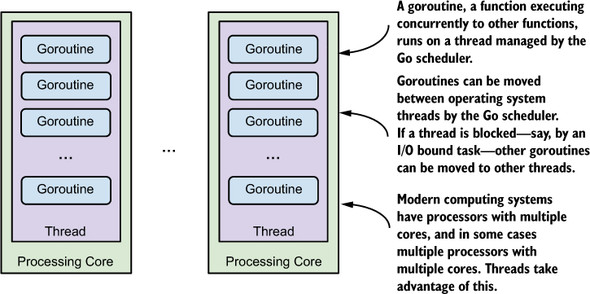
Go has a feature called a goroutine, a function that can be run concurrently to the main program or other goroutines. Sometimes dubbed lightweight threads, goroutines are managed by the Go runtime, where they’re mapped and moved to the appropriate operating system thread and garbage-collected when no longer needed. When multiple processor cores are available, the goroutines can be run in parallel because various threads are running on different processing cores. But from the developer’s point of view, creating a goroutine is as easy as writing a function. Figure 1.2 illustrates how goroutines work.
To further illustrate how this works, let’s look at a goroutine that counts from 0 to 4 while the main program prints Hello World concurrently, as shown in the following listing.
Goroutines —A goroutine is a function that runs independently of the function that started it. Sometimes Go developers explain a goroutine as a function that runs as if it were on its own thread.
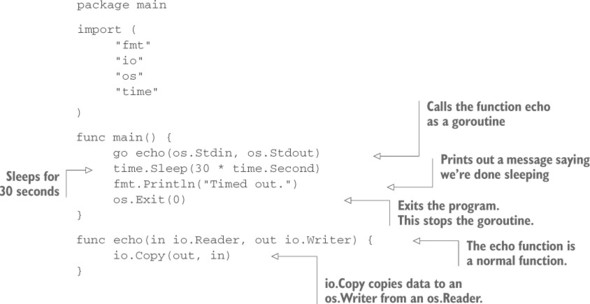
When it comes to syntax, a goroutine is any function that’s called after the special keyword go. Almost any function could, in theory, be called as a goroutine, though there are plenty of functions you probably wouldn’t want to call as goroutines. One of the most frequent uses of goroutines is to run a function “in the background” while the main part of your program goes on to do something else. As an example, let’s write a short program that echoes back any text you type in, but only for 30 seconds, as shown in the next listing. After that, it exits on its own.
This program uses a goroutine to run the echoing behavior in the background, while a timer runs in the foreground. If you were to run the program and type in some text, the output would look something like this:
$ go run echoback.go
Hello.
Hello.
My name is Inigo Montoya
My name is Inigo Montoya
You killed my father
You killed my father
Prepare to die
Prepare to die
Timed out.
Here’s how the program works. Each line that you type in is displayed by the shell as you type it, and then echoed back by the program as soon as it reads the line. And it continues this echo loop until the timer runs out. As you can see in the example, there’s nothing special about the echo function, but when you call it with the keyword go, it’s executed as a goroutine.
The main function starts the goroutine and then waits for 30 seconds. When the main function exits, it terminates the main goroutine, which effectively halts the program.
This is an excerpt from Manning's book Go Web Programming.
Go scales well vertically with its excellent support for concurrent programming. A single Go web application with a single OS thread can be scheduled to run hundreds of thousands of goroutines with efficiency and performance.
Goroutines are functions that run independently with other goroutines. This might seem similar to threads—and in fact, goroutines are multiplexed on threads—but they aren’t threads. A lot more goroutines than threads can be running, because goroutines are lightweight. A goroutine starts with a small stack (8 K as of Go 1.4) and it can grow (or shrink) as needed. Whenever a goroutine is blocked, it blocks the OS thread it’s multiplexed on, but the runtime moves other goroutines on the same blocked thread to another unblocked thread.
Now that you know how goroutines behave, let’s consider goroutine performance. You’ll use the same functions but won’t print to the screen (because doing so would clutter the output) by commenting out the fmt.Println code. The following listing shows the benchmark cases for the print1 and goPrint1 functions in the goroutine_test.go file.
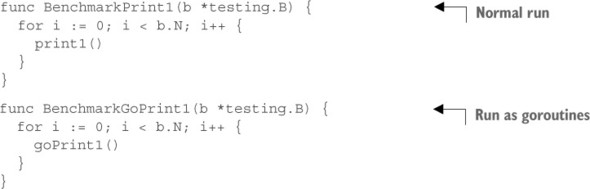
Using goroutines is pretty simple. Add the keyword go in front of any function (either named or anonymous) and the function becomes a goroutine. Let’s see, in the following listing, how this works in a file named goroutine.go.
Listing 9.1. Demonstrating goroutines
package main func printNumbers1() { for i := 0; i < 10; i++ { fmt.Printf("%d ", i) } } func printLetters1() { for i := 'A'; i < 'A'+10; i++ { fmt.Printf("%c ", i) } } func print1() { printNumbers1() printLetters1() } func goPrint1() { go printNumbers1() go printLetters1() } func main() { }The previous listing has two functions, printNumbers1 and printLetters1. These do nothing but loop and print numbers or letters. The function printNumbers1 prints from 0 to 9; printLetters1 prints from A to J. A function named print1 calls printNumbers1 and printLetters1 consecutively, and another function named goPrint1 calls printNumbers1 and printLetters1 as goroutines.

This is an excerpt from Manning's book Go in Action.
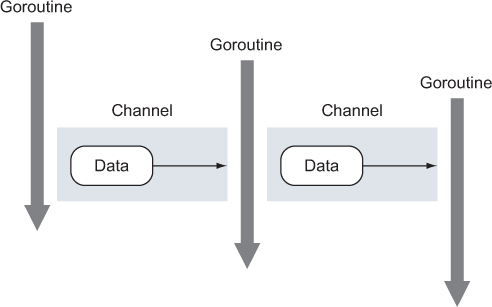
Go’s concurrency support is one of its strongest features. Goroutines are like threads, but use far less memory and require less code to use. Channels are data structures that let you send typed messages between goroutines with synchronization built in. This facilitates a programming model where you send data between goroutines, rather than letting the goroutines fight to use the same data. Let’s look at these features in more detail now.
Listing 2.12. search/search.go: lines 11–57
11 // Run performs the search logic. 12 func Run(searchTerm string) { 13 // Retrieve the list of feeds to search through. 14 feeds, err := RetrieveFeeds() 15 if err != nil { 16 log.Fatal(err) 17 } 18 19 // Create a unbuffered channel to receive match results. 20 results := make(chan *Result) 21 22 // Setup a wait group so we can process all the feeds. 23 var waitGroup sync.WaitGroup 24 25 // Set the number of goroutines we need to wait for while 26 // they process the individual feeds. 27 waitGroup.Add(len(feeds)) 28 29 // Launch a goroutine for each feed to find the results. 30 for _, feed := range feeds { 31 // Retrieve a matcher for the search. 32 matcher, exists := matchers[feed.Type] 33 if !exists { 34 matcher = matchers["default"] 35 } 36 37 // Launch the goroutine to perform the search. 38 go func(matcher Matcher, feed *Feed) { 39 Match(matcher, feed, searchTerm, results) 40 waitGroup.Done() 41 }(matcher, feed) 42 } 43 44 // Launch a goroutine to monitor when all the work is done. 45 go func() { 46 // Wait for everything to be processed. 47 waitGroup.Wait() 48 49 // Close the channel to signal to the Display 50 // function that we can exit the program. 51 close(results) 52 }() 53 54 // Start displaying results as they are available and 55 // return after the final result is displayed. 56 Display(results) 57 }
Concurrency in Go is the ability for functions to run independent of each other. When a function is created as a goroutine, it’s treated as an independent unit of work that gets scheduled and then executed on an available logical processor. The Go runtime scheduler is a sophisticated piece of software that manages all the goroutines that are created and need processor time. The scheduler sits on top of the operating system, binding operating system’s threads to logical processors which, in turn, execute goroutines. The scheduler controls everything related to which goroutines are running on which logical processors at any given time.
Concurrency synchronization comes from a paradigm called communicating sequential processes or CSP. CSP is a message-passing model that works by communicating data between goroutines instead of locking data to synchronize access. The key data type for synchronizing and passing messages between goroutines is called a channel. For many developers who have never experienced writing concurrent programs using channels, they invoke an air of awe and excitement, which you hopefully will experience as well. Using channels makes it easier to write concurrent programs and makes them less prone to errors.
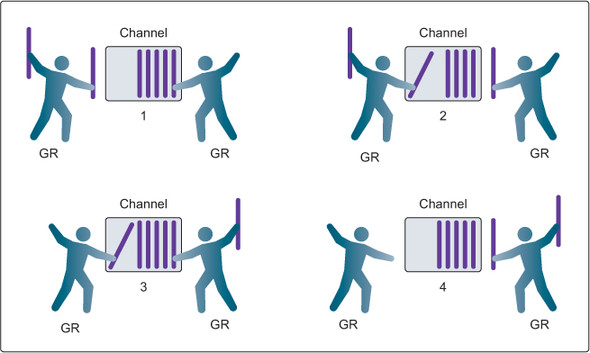
A buffered channel is a channel with capacity to hold one or more values before they’re received. These types of channels don’t force goroutines to be ready at the same instant to perform sends and receives. There are also different conditions for when a send or receive does block. A receive will block only if there’s no value in the channel to receive. A send will block only if there’s no available buffer to place the value being sent. This leads to the one big difference between unbuffered and buffered channels: An unbuffered channel provides a guarantee that an exchange between two goroutines is performed at the instant the send and receive take place. A buffered channel has no such guarantee.
In figure 6.7 you see an example of two goroutines adding and removing items from a buffered channel independently. In step 1 the goroutine on the right is in the process of receiving a value from the channel. In step 2 that same goroutine is able to complete the receive independent of the goroutine on the left sending a new value into the channel. In step 3 the goroutine on the left is sending a new value into the channel while the goroutine on the right is receiving a different value. Neither of these two operations in step 3 are in sync with each other or blocking. Finally, in step 4 all the sends and receives are complete and we have a channel with several values and room for more.
Let’s look at an example using a buffered channel to manage a set of goroutines to receive and process work. Buffered channels provide a clean and intuitive way to implement this code.
Listing 6.24. listing24.go
01 // This sample program demonstrates how to use a buffered 02 // channel to work on multiple tasks with a predefined number 03 // of goroutines. 04 package main 05 06 import ( 07 "fmt" 08 "math/rand" 09 "sync" 10 "time" 11 ) 12 13 const ( 14 numberGoroutines = 4 // Number of goroutines to use. 15 taskLoad = 10 // Amount of work to process. 16 ) 17 18 // wg is used to wait for the program to finish. 19 var wg sync.WaitGroup 20 21 // init is called to initialize the package by the 22 // Go runtime prior to any other code being executed. 23 func init() { 24 // Seed the random number generator. 25 rand.Seed(time.Now().Unix()) 26 } 27 28 // main is the entry point for all Go programs. 29 func main() { 30 // Create a buffered channel to manage the task load. 31 tasks := make(chan string, taskLoad) 32 33 // Launch goroutines to handle the work. 34 wg.Add(numberGoroutines) 35 for gr := 1; gr <= numberGoroutines; gr++ { 36 go worker(tasks, gr) 37 } 38 39 // Add a bunch of work to get done. 40 for post := 1; post <= taskLoad; post++ { 41 tasks <- fmt.Sprintf("Task : %d", post) 42 } 43 44 // Close the channel so the goroutines will quit 45 // when all the work is done. 46 close(tasks) 47 48 // Wait for all the work to get done. 49 wg.Wait() 50 } 51 52 // worker is launched as a goroutine to process work from 53 // the buffered channel. 54 func worker(tasks chan string, worker int) { 55 // Report that we just returned. 56 defer wg.Done() 57 58 for { 59 // Wait for work to be assigned. 60 task, ok := <-tasks 61 if !ok { 62 // This means the channel is empty and closed. 63 fmt.Printf("Worker: %d : Shutting Down\n", worker) 64 return 65 } 66 67 // Display we are starting the work. 68 fmt.Printf("Worker: %d : Started %s\n", worker, task) 69 70 // Randomly wait to simulate work time. 71 sleep := rand.Int63n(100) 72 time.Sleep(time.Duration(sleep) * time.Millisecond) 73 74 // Display we finished the work. 75 fmt.Printf("Worker: %d : Completed %s\n", worker, task) 76 } 77 }