concept application in category gradle

This is an excerpt from Manning's book Gradle in Action - corrected 9052019.
The testing process slows to a crawl. The quality assurance (QA) team is eager to get their hands on a first version of the application. As you can imagine, they aren’t too happy about testing low-quality software. With every fix the development team puts into place, they have to run through the same manual process. The team stops to check new changes into version control, a new version is built from an IDE, and the deliverable is copied to the test server. Each and every time, a developer is fully occupied and can’t add any other value to the company. After weeks of testing and a successful demo to the investor, the QA team says the application is ready for prime time. Deployment turns into a marathon. From experience, the team knows that the outcome of deploying an application is unpredictable due to unforeseen problems. The infrastructure and runtime environment has to be set up, the database has to be prepared with seed data, the actual deployment of the application has to happen, and initial health monitoring needs to be performed. Of course, the team has an action plan in place, but each of the steps has to be executed manually.
This section introduces a simple application to illustrate the use of Gradle: a To Do application. Throughout the book, we’ll apply the content to demonstrate Gradle’s features in each phase of the build pipeline. The use case starts out as a plain Java application without a GUI, simply controlled through console input. Over the course of this chapter, you’ll extend this application by adding components to learn more advanced concepts.
The To Do application will act as a vehicle to help you gain a broad knowledge of Gradle’s capabilities. You’ll learn how to apply Gradle’s standard plugins to bootstrap, configure, and run your application. By the end of this chapter, you’ll have a basic understanding of how Gradle works that you can apply to building your own web-based Java projects with Gradle.
$ java -cp build/classes/main com.manning.gia.todo.ToDoApp

--- To Do Application ---
Please make a choice:
(a)ll items
(f)ind a specific item
(i)nsert a new item
(u)pdate an existing item
(d)elete an existing item
(e)xit
>
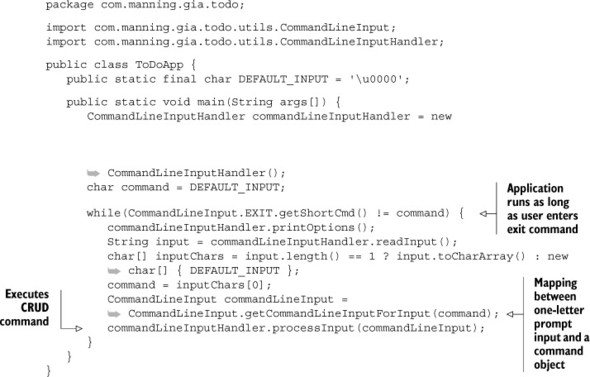
The class ToDoApp prints the application’s options on the console, reads the user’s input from the prompt, translates the one-letter input into a command object, and handles it accordingly, as shown in the next listing.
So far, we’ve discussed the components of the application and their interactions in the context of a specific use case: finding all to-do items of a user. Listing 3.3 should give you a rough idea of the components responsibilities and how they work internally. Don’t worry if you don’t understand every little implementation detail of the class definitions presented here. What’s more important is the automation of the project. We’ll look at specific concerns like setting up the project with Gradle, compiling the source code, assembling the JAR file, and running the application in the rest of the chapter. It’s time for Gradle to hit the stage.