concept Gradle task in category gradle

This is an excerpt from Manning's book Gradle in Action - corrected 9052019.
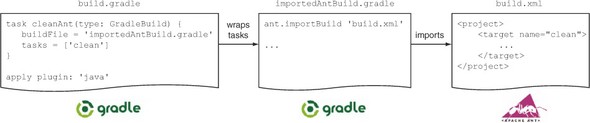
Existing Ant scripts can be imported into your Gradle build seamlessly and used as you’d use any other external Gradle script. Ant targets directly map to Gradle tasks at runtime. Gradle ships with the Ant libraries and exposes a helper class to your scripts called AntBuilder, which fully blends into Gradle’s DSL. It still looks and feels like Ant’s XML, but without the pointy brackets. Ant users will feel right at home, because they don’t have to transition to Gradle syntax right away. Migrating from Ant to Gradle is also a no-brainer. You can take baby steps by reusing your existing Ant logic while using Gradle’s benefits at the same time.
Listing the tasks available to the Gradle build script reveals that Ant targets are treated as Gradle tasks:
Later, you’ll translate the logic of Ant targets into Gradle tasks, but you’ll start small by picking targets with simple logic. Try to implement the logic of the targets “the Gradle way” instead of falling back to an implementation backed by the AntBuilder. Let’s discuss this with the help of an example. Assume you have the following Ant target: