concept Groovy plugin in category gradle

This is an excerpt from Manning's book Gradle in Action - corrected 9052019.
Let’s assume you wrote your test class in Groovy using Spock. To be able to compile Groovy classes in the default source directory src/test/groovy, your project will need to apply the Groovy plugin. The Groovy plugin requires you to declare the version of Groovy you’d like to use in your project as a dependency. Because you need to use Groovy for test source code compilation, you’ll assign the library to the testCompile configuration. In addition to the Groovy library, you’ll also declare the version of the Spock library. The next listing illustrates the setup required for compiling and executing Spock tests.
In this book, you already used Groovy to write project infrastructure code. You used the Spock framework to write unit tests for your production application code. We also looked at how Groovy can be used to implement custom Gradle tasks. For conservative organizations, these are suitable use cases for incorporating Groovy, because the code isn’t deployed to a production environment. There are many good reasons why you may also want to use Groovy instead of Java for implementing production code. Groovy is a great match for writing DSLs with the help of its meta-programming features. This is something Gradle does itself. It uses Java to implement the core logic, but wraps it with Groovy to expose the powerful DSL you’re now accustomed to. Groovy support in Gradle is provided by the Groovy plugin. Let’s look at its features and see where the Java base plugin comes into play.
By applying the Groovy plugin, you equipped your project with the capabilities to compile Groovy source code and the default source sets that define where the compiler looks for the source code files.
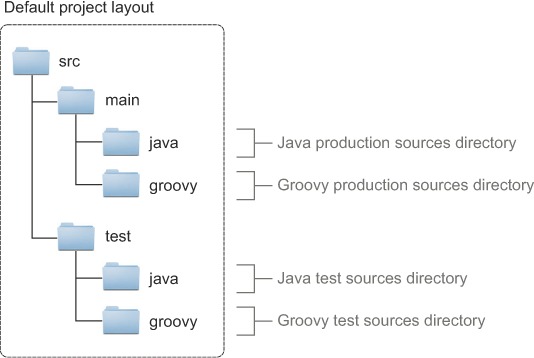
Remember that the Groovy plugin automatically applies the Java plugin as well. This means that your project now contains a source set for Java sources and one for Groovy sources. Figure 11.4 shows the default project layout with the applied Groovy plugin.