concept method in category gradle

This is an excerpt from Manning's book Gradle in Action - corrected 9052019.
A feature we’ve talked about before is Gradle’s tight integration with Ant
. Because you have full access to Groovy’s language features, you can also print your message in a method named chant(). This method can easily be called from your task. Every script is equipped with a property called ant that grants direct access to Ant tasks. In this example, you print out the message “Repeat after me” using the Ant task echo to start the therapy session.
In this chapter, we’ll explore the basic building blocks of a Gradle build, namely projects and tasks, and how they map to the classes in the Gradle API. Properties are exposed by methods of these classes and help to control the build. You’ll also learn how to control the build’s behavior through properties, as well as the benefits of structuring your build logic.
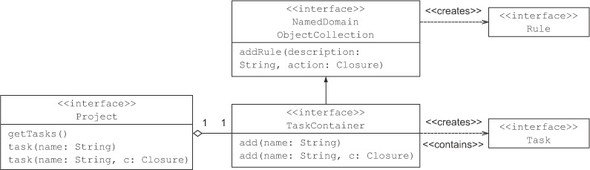
You just read about defining a naming pattern for a task rule, but how do you actually declare a task rule in your build script? To add a task rule to your project, you’ll first need to get the reference to TaskContainer. Once you have the reference, you can call the method addRule(String, Closure). The first parameter provides a description (for example, the task name pattern), and the second parameter declares the closure to execute to apply the rule. Unfortunately, there’s no direct way of creating a task rule through a method from Project as there is for simple tasks, as illustrated in figure 4.10.
The action logic within the task makeReleaseVersion is fairly simple. Code maintainability is clearly not an issue at the moment. However, when working on your projects you’ll notice that simple tasks can grow in size quickly the more logic you need to add to them. The need for structuring your code into classes and methods will arise. You should be able to apply the same coding practices as you’re used to in your regular production source code, right? Gradle doesn’t suggest a specific way of writing your tasks. You have full control over your build source code. The programming language you choose, be it Java, Groovy, or any other JVM-based language, and the location of your task is up to you.