concept output in category gradle

This is an excerpt from Manning's book Gradle in Action - corrected 9052019.
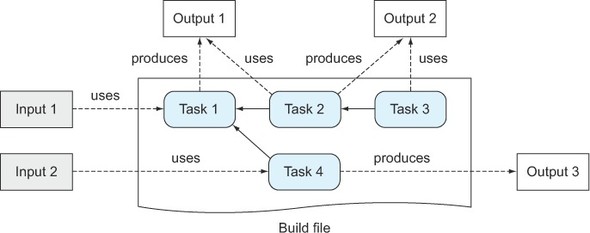
A task takes an input, works on it by executing a series of steps, and produces an output. Some tasks may not need any input to function correctly, nor is creating an output considered mandatory. Complex task dependency graphs may use the output of a dependent task as input. Figure 1.7 demonstrates the consumption of inputs and the creation of outputs in a task graph.
I already mentioned an example that follows this workflow. We took a bunch of source code files as input, compiled them to classes, and assembled a deliverable as output. The compilation and assembly processes each represent one task. The assembly of the deliverable only makes sense if you compiled the source code first. Therefore, both tasks need to retain their order.
Gradle determines if a task is up to date by comparing a snapshot of a task’s inputs and outputs between two builds, as shown in figure 4.6. A task is considered up to date if inputs and outputs haven’t changed since the last task execution. Therefore, the task only runs if the inputs and outputs are different; otherwise, it’s skipped.
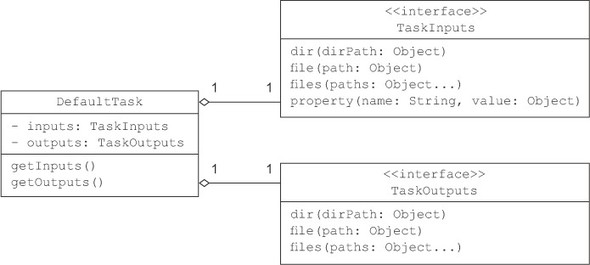
An input can be a directory, one or more files, or an arbitrary property. A task’s output is defined through a directory or 1...n files. Inputs and outputs are defined as fields in class DefaultTask and have a direct class representation, as shown in figure 4.7.