concept production environment in category gradle

This is an excerpt from Manning's book Gradle in Action - corrected 9052019.
Release stage: Either delivers the software to the end user as a packaged distribution or deploys it to the production environment.
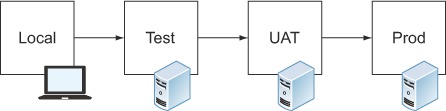
The main maxim of continuous delivery is to get the software from the developer’s machine into the hands of the end users as quickly and frequently as possible. However, that doesn’t mean that you assemble your deliverable and deploy it in the production environment right away. In between these steps, a build pipeline usually verifies functional and nonfunctional requirements in other environments, as shown in figure 15.2.
At the beginning of this chapter, you created a virtual machine on your developer machine. Though the virtual machine has a production-like setup, you use this environment solely for testing purposes. The test environment brings together code changes from multiple developers of the team. Therefore, it can be seen as the first integration point of running code. On the deployed application in the test environment, you can run automated acceptance tests to verify functional and nonfunctional requirements. The user acceptance test (UAT) environment typically exists for the purpose of exploratory, manual testing. Once the QA team considers the current state of the software code to be satisfactory, it’s ready to be shipped to production. The production environment directly serves to the end user and makes new features available to the world.
If you want to use the same code for deploying to all of these environments, you’ll need to be able to dynamically target each one of them at build time. Naturally, the test, UAT, and production environments run on different servers with potentially different ports and credentials. You could store the configuration as extra properties in your build script, but that would quickly convolute the logic of the file. Alternatively, you could store this information in a gradle.properties file. In both cases, you’d end up with a fairly unstructured list of properties. At build time, you’d have to pick a set of properties based on a naming convention. Doesn’t sound very flexible, does it? There’s a better way of storing and reading this configuration with the help of a standard Groovy feature.
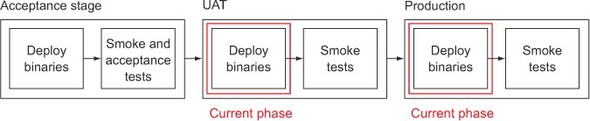
You already configured a push-button deployment in step 6. The same configuration needs to apply to the job that deploys the artifact to the production environment, as shown in figure 15.9.
We won’t go into too much detail about the configuration of these jobs. In fact, they look very similar to the jobs that you set up to implement the acceptance stage. The big differentiator is the environment they target. In the Gradle build step, the UAT deployment job needs to set the –Penv=uat switch. The deployment job to the production environment applies the setting –Penv=prod.