concept root project in category gradle

This is an excerpt from Manning's book Gradle in Action - corrected 9052019.
Gradle support for multimodule builds will be explained with the help of your To Do web application. You’ll start by deconstructing the existing project structure and break out individual, functional subprojects. This newly created project layout will serve as a basis for modeling the build. Then we’ll go over the options for organizing your build logic and you’ll get to know the part of the Gradle API that helps define individual and common project behavior. Finally, you’ll learn how to control the project execution order by declaring project dependencies, and how to execute a single subproject or the full build for all participating subprojects from the root project. Not only will this chapter teach you the structure of a multiproject build, but you’ll also learn how to bring down your build’s execution time, something everyone can appreciate. You’ll start by refactoring the existing To Do application project structure into a modularized architecture.
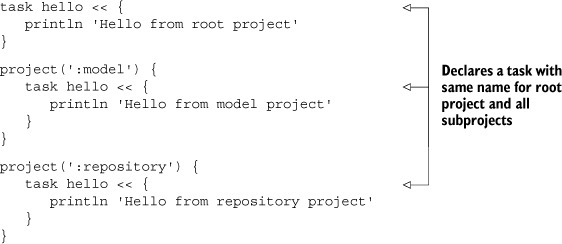
Let’s assume you define a task named hello in the root project as well as all subprojects, as shown in the following listing. In each of the doLast actions, you print out a message on the console to indicate the project you’re in.
$ gradle hello
:hello
Hello from root project
:model:hello
Hello from model project
:repository:hello
Hello from repository project
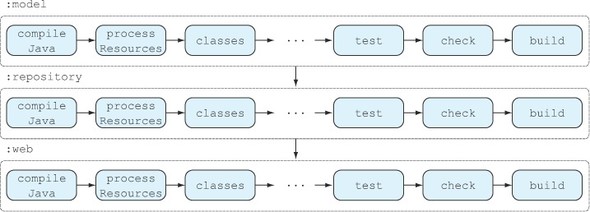
After passing the initialization phase, Gradle holds an internal model of the project’s dependencies in memory. It knows that the subproject repository depends on model and the subproject web depends on repository. You don’t have to execute a task from a particular subproject—you can execute one for all projects of the build. Let’s say you want to execute the task build from the root project. Given the fact that Gradle knows the order in which the subprojects need to be executed, you’d expect the build to play out as shown in figure 6.9.