concept setting file in category gradle

This is an excerpt from Manning's book Gradle in Action - corrected 9052019.
So far we’ve only dealt with the Gradle configuration of single-project builds. You saw that separating your code into multiple projects wasn’t all that hard. What’s missing is the build support that represents the root project and its subprojects. The declaration of subprojects in a multiproject build is done via the settings file.
The settings file declares the configuration required to instantiate the project’s hierarchy. By default, this file is named settings.gradle and is created alongside the build.gradle file of the root project. The following listing shows the contents of the settings file. For each of the subprojects you want to be part of the build, you call the method include with the argument of the project’s path.
Executing the help task projects after adding the settings file will produce a different result:
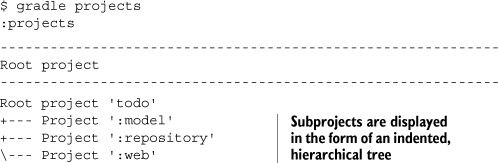
By adding a single settings file, you created a multimodule build containing a root project and three subprojects. No additional configuration was needed. Let’s go deeper into the details of the settings file. You may have guessed already that there’s an API representation for it that you can use to query and modify the configuration of your build.