concept test in category gradle

This is an excerpt from Manning's book Gradle in Action - corrected 9052019.
My IDE does the job. At Acme, developers do all their coding within the IDE, from navigating through the source code, implementing new features, and compiling and refactoring code, to running unit and integration tests. Whenever new code is developed, they press the Compile button. If the IDE tells them that there’s no compilation error and the tests are passing, they check the code into version control so it can be shared with the rest of the team. The IDE is a powerful tool, but every developer will need to install it first with a standardized version to be able to perform all of these tasks, a lesson Joe learns when he uses a new feature only supported by the latest version of the compiler.
Gradle integrates with a wide range of Java and Groovy unit testing frameworks. By the end of this chapter, you’ll write tests with JUnit, TestNG, and Spock, and execute them as part of the build lifecycle. You’ll also tweak the default test execution behavior. You’ll learn how easy it is to control the test logging output and to add a hook or listener to react to test lifecycle events. We’ll also explore how to improve the performance of big test suites through forked test processes. Integration and functional tests require a more complex tooling setup. You’ll learn how to use the third-party tools H2 and Geb to bootstrap your test code.
Before you start exercising tests with your build, let’s do a quick refresher on the different types of testing as well as their individual advantages and disadvantages.
You learned in the last section that the task test will first compile the production source, and then create the JAR file followed by test sources compilation and test execution. The following command-line output indicates a failed build due to a test assertion error:
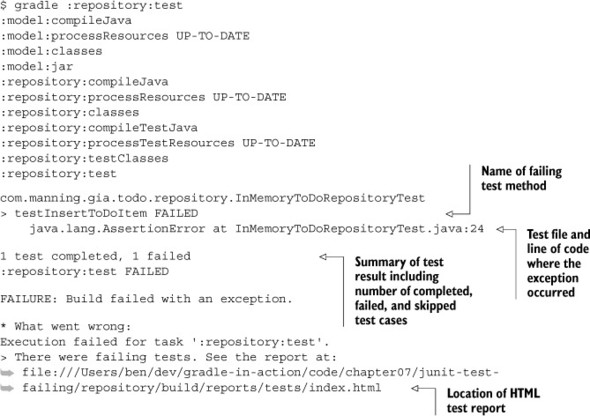
In the console output, you can see that one of the assertions failed. This is exactly the result you expected. The displayed information doesn’t indicate why the test failed. The only thing you know is that an assertion failed on line 24. If you had a huge suite of tests, finding out the cause of any failed test would require you to open the test report. You can make the test output a bit chattier by running the task on the INFO logging level:
Projects with huge test suites call for fine-grained control of the tests you’d like to execute. Every so often, you’ll want to run just a single test or tests of a particular package or project. This situation quickly arises if one or more tests fail, and you’d like to fix and rerun them without taking the hit of executing the full test suite.
$ gradle printAppServerHome -Penv=test
:printAppServerHome
Using environment 'test'
The test server's home directory: /path/to/test/appserver