concept queue in category grails

This is an excerpt from Manning's book Grails in Action, Second Edition.
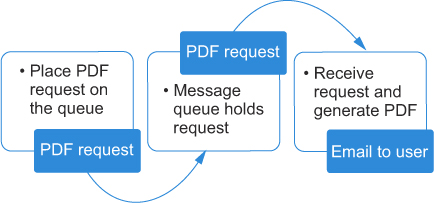
This is a classic example of a candidate for messaging, and this “do it soon” approach is known as asynchronous processing. Here’s how it might work behind the scenes: when the user requests a flight itinerary, a message is placed on an itinerary message queue. That can be done immediately, and you can report to the user that the PDF is in the mail. Another process, perhaps even on a different server (inside a firewall, with access to a mail server), retrieves the itinerary request off the queue, generates the PDF, and emails it to the user. Figure 15.1 shows the PDF request flowing through the queue to the target process.
One of the cool parts of this asynchronous approach is that the messaging server persists the messages on the queue, so the messages remain until a client is available to service them. If generating PDFs is a bottleneck, you can have many clients listening on the queue to partition the work of generating and mailing PDFs, and the messaging server preserves the transactional semantics, making sure requests are removed from the queue after they’re serviced.
The JMS plugin provides a jmsService that you can inject into your service and controller classes, giving you a range of JMS-related methods. The method you invoke on your jmsService object depends on whether you send your message to a queue or a topic. Table 15.1 lists the methods for each destination type.
Table 15.1. Method names for each destination type
Destination
Method
Queue sendJMSMessage() sendQueueJMSMessage() Topic sendPubSubJMSMessage() sendTopicJMSMessage() Queues and topics each have two methods, but they’re aliases to one another, so feel free to use whichever makes more sense to you. For your examples, use jmsService .sendQueueJMSMessage() for queues and jmsService.sendTopicJMSMessage() for topics because they make things explicit (which is a good thing for other developers).
Whether you’re dealing with queues or topics, the method parameters are the same. The first parameter is the destination name (the name of the queue or topic in your messaging server), and the second is the payload of the message. ActiveMQ doesn’t require that you precreate queue names, but your provider may differ. Optional third and fourth parameters in the latest versions of the plugin support JMS message templating and custom postprocessing of messages after creation, but in practice their use is less common, so explore these parameters if and when you need them.
In the following example, you add a JabberService class that sends your messages. You’ll place a Map holding all of your relevant message data on the queue.
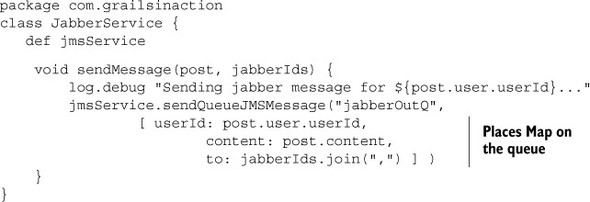
All the infrastructure is in place, but nothing is available to read off the queue. Let’s write a test harness to generate traffic. The following listing shows a basic test case to exercise the service.
Listing 15.5. Exercising your Jabber service with an integration test
package com.grailsinaction import grails.plugin.spock.IntegrationSpec class JabberServiceIntegrationSpec extends IntegrationSpec { def jabberService def "First send to a queue"() { given: "Some sample queue data" def post = [user: [userId: 'chuck_norris'], content: 'is backstroking across the atlantic'] def jabberIds = ["glen@grailsinaction.com", "peter@grailsinaction.com" ] expect: jabberService.sendMessage(post, jabberIds) } }Make sure you started ActiveMQ, and then give the test case a run with grails test-app integration: Jabber*. This test shows that you can put elements on a queue.
Before you implement messaging, you need to understand basic JMS terminology. All the plugin documentation and sample articles assume you know what producers, queues, and topics are, so we first cover those and give you a feel for which situations lend themselves to which messaging techniques.