concept React application in category graphql

This is an excerpt from Manning's book Fullstack GraphQL Applications With GRANDstack.
Create React App is a command line tool that can be used to quickly create the scaffolding for a React application, taking care of configuring build settings, installing dependencies, and templating a simple React application to get started.
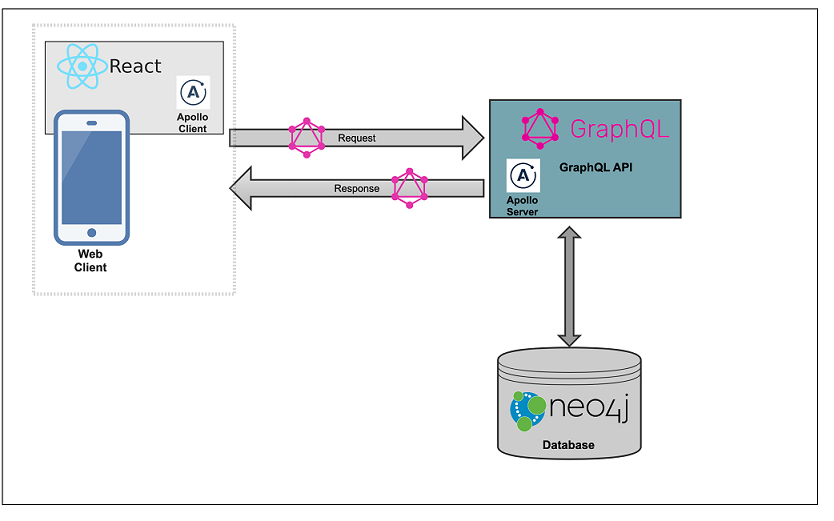
So far in the book we’ve been focused on backend aspects of our application: building the GraphQL API and working with the database, now it’s time to turn our attention to the frontend. In Chapter One we gave a very brief overview of React and looked at a minimal code snippet of a React component. In this chapter we return to React and begin building a React application that will be a client of our GraphQL API, searching for businesses and rendering results in the browser. Of course it would be impossible to include everything we need to know for an introduction to React in a single chapter, so rather than aiming to provide a comprehensive introduction to React, the goal of this chapter is to explain the fundamental concepts of React necessary to get started building a single page application. We offer an opinionated approach of getting started using the Create React App command line tool.
The goal for this chapter will be to create the skeleton of our React application, using Create React App to handle build tooling and configuration. We’ll then update the template application, creating the components necessary to search for businesses by category and view the results. Initially our data will just be hardcoded in the application, then later in Chapter Six we add data-fetching logic to the React application, connecting the GraphQL API we created in previous chapters using Apollo Client.
Figure 5.1. This chapter focuses on building the React application that will become a client of our GraphQL API