concept request in category graphql

This is an excerpt from Manning's book GraphQL in Action.
This is nice because no matter what storage engine (or multiple storage engines) you have to deal with, with GraphQL you make API servers and client applications both work with a universal language for requests and a universal language for responses.
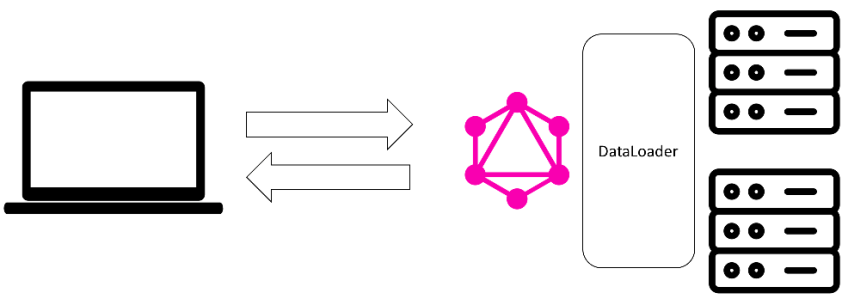
Figure 1.6. DataLoader can optimize the requests between GraphQL and databases
Listing 8.18. Request to test
userLogin:mutation userLogin { userLogin(input: { username: "test", #1 password: "123456" }) { errors { message } user { id name } authToken } }
Modern browsers have native APIs to do Ajax requests. For example, browsers today come with a built-in
fetchmethod that can be used to invoke any type of HTTP Ajax requests. However, if you need to support older browsers, you cannot usefetchdirectly but you can use a library that wraps the native API or polyfill it if they it doesn’t exist. One common option here is "cross-fetch", as it will also allow you to do data fetching from Node.js and that’s something you’ll need if you plan on doing any server-side rendering of your web applications. We’ll use that. It’s already part of this project’s dependencies.

This is an excerpt from Manning's book Fullstack GraphQL Applications With GRANDstack.
Of course GraphQL is not a silver bullet and we should not think of GraphQL as the solution to all of our API-related problems. One of the most notable challenges of adopting GraphQL is that some well understood practices from REST don’t apply when using GraphQL. For example, HTTP status codes are commonly used to convey success, failure and other cases of a REST request: 200 OK means our request was successful and 404 Not Authorized means we forgot an auth token or don’t have the correct permissions for the resource requested. However with GraphQL, each request returns 200 OK, regardless if the request was a complete success or not. This makes error handling a bit different in the GraphQL world. Instead of a single status code describing the result of our request, GraphQL errors are typically returned at the field level of the selection set. This means that we may have successfully retrieved a part of our GraphQL query, while other fields returned errors.