concept user in category graphql

This is an excerpt from Manning's book GraphQL in Action.
This simple versioning approach has some challenges. Keeping old nodes forever introduces some downsides. More maintenance effort will be needed to make sure old nodes still work as they should. Furthermore, users of the APIs might be confused about which fields are old and which are new. GraphQL offers a way to deprecate (and hide) older nodes so that readers of the schema only see the new ones. Once a field is deprecated, the maintainability problem becomes a question of how long old users will continue to use it. The great thing here is that as a maintainer, you can confidently answer the questions "is a field still being used?" and "how often is a field being used?" thanks to the client query language. The removal of not-used deprecated fields can even be automated.
Also, because users of the AZdev application will be able to vote on Approaches, we should probably make the API return the list of Approaches sort by their number of votes. The simplest way to account for the number of votes on Approaches is to just add a "cache" of how many current votes each Approach object has. Let’s do that:
We can use a subscription operation for that. This operation will have to accept a taskId input so that a user can subscribe to the vote changes on Approaches under a single Task object (rather than all Approaches in the system).
Listing 4.33. Pseudo Subscription #1: voteChanged
subscription {
  voteChanged (
    # Input to identify a Task record
  ) {
    # Fields under an Approach record
  }
}
On the AZdev home page which shows the list of all the latest Tasks, another subscriptions-based feature that would add a good value there is to show an indicator telling the user that there are new Task records avaialble. They can click that indicator to show them. Let’s name this one
taskMainListChanged:
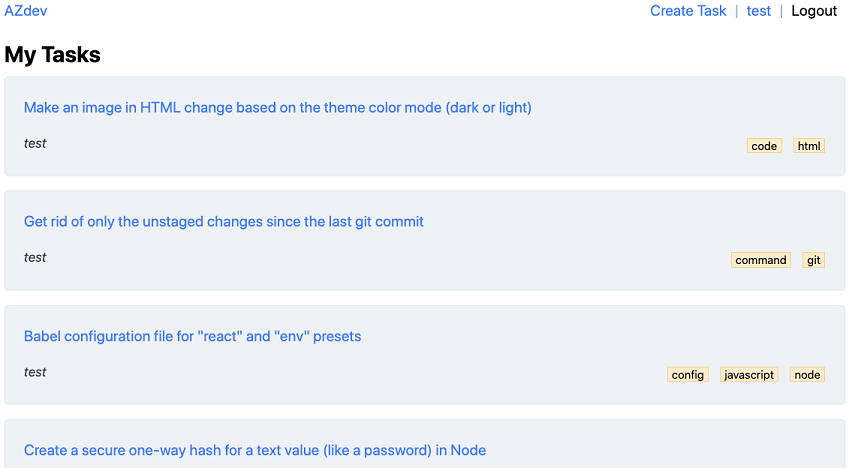
Figure 9.20. The page for the user’s own Task records

This is an excerpt from Manning's book Fullstack GraphQL Applications With GRANDstack.
Since GraphQL services can be implemented in any language, a language agnostic Schema Definition Language (SDL) is used to define GraphQL types. Let’s look at an example, motivated by considering a simple movies application. Imagine you’ve been hired to create a website that allows users to search a movie catalog for movie details such as title, actors, and description, as well as show recommendations for similar movies the user may find interesting.
Listing 2.9. Sample data for businesses, reviews, and users representing our data layer
const businesses = [
  {
    businessId: "b1",
    name: "Missoula Public Library",
    address: "301 E Main St, Missoula, MT 59802",
    reviewIds: ["r1", "r2"]
  },
  {
    businessId: "b2",
    name: "San Mateo Public Library",
    address: "55 W 3rd Ave, San Mateo, CA 94402",
    reviewIds: ["r3"]
  }
];

const reviews = [
  {
    reviewId: "r1",
    stars: 3,
    text: "Friendly staff. Interlibrary loan is super fast",
    businessId: "b1",
    userId: "u1"
  },
  {
    reviewId: "r2",
    stars: 4,
    text: "Easy downtown access, lots of free parking",
    businessId: "b1",
    userId: "u2"
  },
  {
    reviewId: "r3",
    stars: 5,
    text:
      "Lots of glass and sunlight for reading. Comfy chairs in large print section.",
    businessId: "b1",
    userId: "u1"
  }
];

const users = [
  {
    userId: "u1",
    name: "Will",
    reviewIds: ["r1", "r2"]
  },
  {
    userId: "u2",
    name: "Bob",
    reviewIds: ["r3"]
  }
];

const db = { businesses, reviews, users };
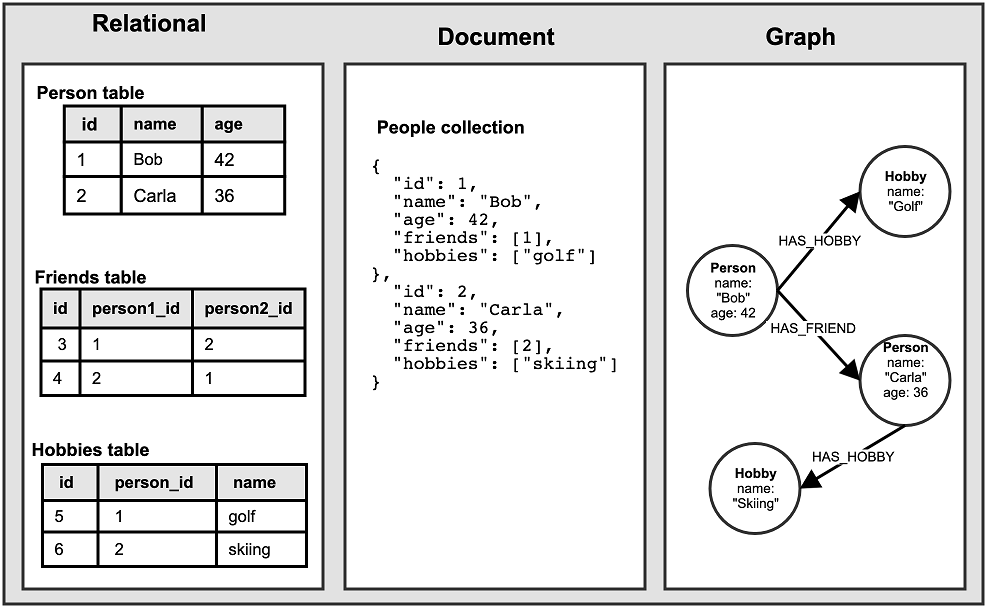
Fundamentally, a graph database is a software tool that allows the user to model, store, and query data as a graph. Working with a graph at the database level is often more intuitive for modeling complex connected data and can be more performant when working with complex queries that require traversing many connected entities.
Unlike other databases that use tables or documents to model data, graph databases like Neo4j model, store, and allow the user to query data as a graph. In a graph, nodes are the entities and relationships connect them. In a relational database, we represent relationships with foreign keys and join tables. In a document database, we reference other entities using ids or even denormalizing and embedding other entities in a single document.
Figure 3.1. Comparing datamodels across relational, document, and graph
The first step when working with a database is to determine the datamodel that will be used. In our case our datamodel will be driven from the business requirements we’ve defined in the previous chapter, working with businesses, users, and reviews. Review the requirements listed in the first section of the previous chapter for a refresher. Let’s take those requirements and our knowledge of the domain to create a "Whiteboard Model".