concept index in category graphs

This is an excerpt from Manning's book Graph Databases in Action.
The final step before we’re ready to start our application is to configure the database that our application will use. With a RDBMS, we’d create a new database and explicitly define the schema, or data model, elements (e.g. tables, columns, views, keys, indexes) prior to writing code. The Apache TinkerPop Gremlin Server doesn’t require a pre-defined schema to be applied to the graph, though the implementations of other graph database vendors might. Since we’re using Gremlin Server we can start writing code without having to first apply a schema or data model to our graph.
The first approach, adding a global index on the first_name property, has two problems. The first is that it may not be easy to create the correct index or indices needed. While TinkerGraph does allow us to add a global index on a property called first_name, global indexes themselves aren’t common among graph database vendors. Most databases that support indices require that the index be a combination of both label and property. Even with the proper global indices created, we still have to search all vertex labels. Even though we’re searching the vertex labels faster, we still have to manipulate all of them, which is the second problem with this approach.
The second, and preferred, method is to add the appropriate labels to our filtering queries, and also add indices for the vertex and property combination. After adding the proper filtering to our traversal, it now looks like this:

This is an excerpt from Manning's book Neo4j in Action.
Table t_user contains columns with user information, while table t_user_friend simply has two columns referencing table t_user using a foreign key relation. The primary key and foreign key columns have indexes for quicker lookup operations, a strategy typically employed when modeling relational databases.
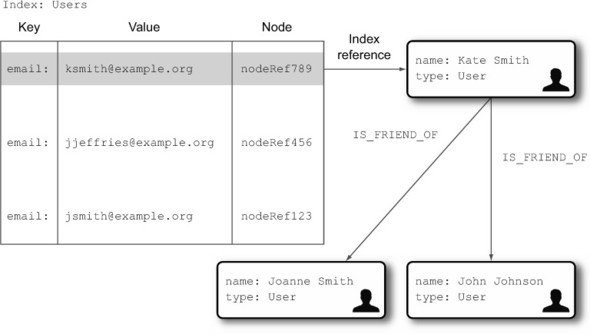
To determine where to start in the graph, Neo4j uses indexing. An index in a relational database provides the ability to quickly and easily find rows in a table by the values of particular columns. Similarly, Neo4j indexing makes it easy to find nodes or relationships with particular property values. Unlike a relational database, Neo4j requires your application code to create and maintain index entries.
Because the application code takes on the responsibility for indexing, you need to give careful thought to your indexing strategy. Poor decisions about indexing can lead to poor performance or excessive disk use. In this chapter we’ll show you how to create, maintain, and use indexes with Neo4j. We’ll then explore why you should index and discuss the inevitable trade-offs you’ll need to make when creating an indexing strategy.