concept name in category graphs

This is an excerpt from Manning's book Graph Databases in Action.
We classify these types of questions are as Search or Selection problems. They focus very narrowly on finding a small set of entities that all share a common attribute such as name, location, or employer. In most databases this requires using a single filtering criterion, or potentially an index. These sorts of questions do not require rich relationships within the data. While you can answer them with a graph database, these problems do not use or require graph-specific functionality.
Figure 5.9 Our simplified social network with person vertices labeled with the name
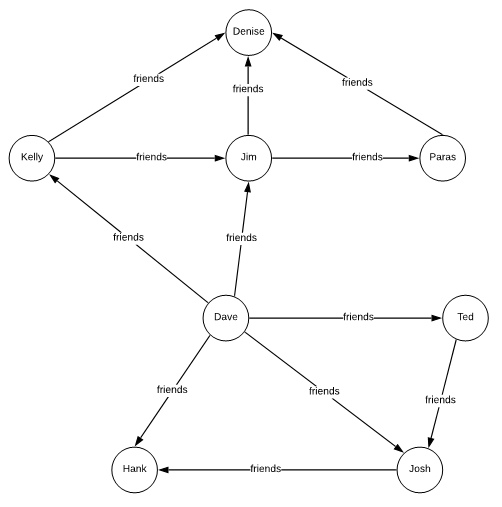
It may surprise you that we don’t need to specify the name of a database (or a graph) in the connection configuration. It is common in relational databases to specify the name of the database since relational servers often host more than one database. However, most graph database servers only support a single graph per instance. With only a single graph we don’t need to specify which one to use.
public static String addFriendsEdge(GraphTraversalSource g){
    Scanner keyboard = new Scanner(System.in);
    System.out.println("Enter the name for the person at the edge start:");
    String fromName = keyboard.nextLine();
    System.out.println("Enter the name for the person at the edge end:");
    String toName = keyboard.nextLine();

    //This returns an Edge type
    Edge newEdge = g.addE("friends").
          from(__.V().has("person", "first_name", fromName)). #A
        to(__.V().has("person", "first_name", toName)). #B
        next();

    return newEdge.toString();
}

This is an excerpt from Manning's book Neo4j in Action.
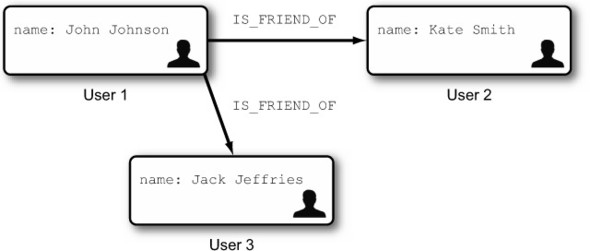
Okay, you have a few users, represented as boxes, who are friends in the social network. To differentiate between users, you can add a name property to each one, as shown in figure 3.3.
node_keys_indexable=name, dateOfBirth
relationship_keys_indexable=type,name