concept property in category graphs

This is an excerpt from Manning's book Graph Databases in Action.
Now that we created the structure of our graph model, composed of the vertices and edges, it is time to define the properties and assign them to the vertices and edges. Properties in a graph data model are key-value pairs that describe specific attribute of a vertex or edge.
//This returns a List of the properties
List properties = g.V().
        has("person", "first_name", name).
        valueMap().toList();
Simplifying traversals by moving properties to edges
7.3.5 Moving Properties to Edges
The concept behind this optimization is straightforward. Move a property from a vertex to the incident edge to reduce the number of steps your traversal has to process. However, in practice this process is more nuanced.
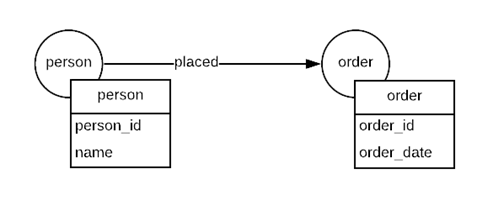
Let’s return to the example of a simple order system for a retail website. In this retail site, a person can place one or more orders, and each order has a date. Coming from a relational world, our instinct is to build a model with a person vertex, an order vertex, and an edge between named placed. We’d add properties for person_id, the name of a person to the person vertex, as well as the order_id, and order_date to the order vertex, demonstrated in figure 7.15.
Figure 7.15 An order system showing properties on vertices only

This is an excerpt from Manning's book Neo4j in Action.
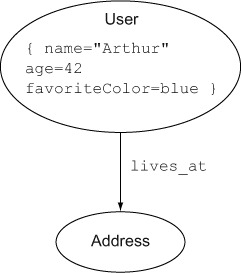
If you convert these nodes into properties on the User node, and rename the remaining has_property relationship so that it more closely describes the relationship the User has with their Address, then the diagram will look like figure 2.8.
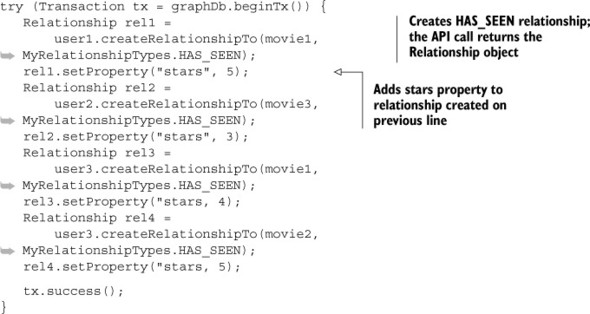
There is one significant difference between the HAS_SEEN and IS_FRIEND_OF relationships: the HAS_SEEN relationship contains the additional information about how much the user liked the movie (represented by the number of stars the user gave to the movie). The number of stars is therefore not a property of the user node (because a user can rate multiple movies) or of the movie node (the movie can be rated by multiple users), but rather a property of the relationship between the user and the movie. You’ve seen how you can add properties to nodes, but adding properties to relationships is a new concept at this point.
We mentioned before that Neo4j is a property graph. In Neo4j, property graph applies to all graph entities—relationships as well as nodes. Adding a property to a relationship in Neo4j is as simple as adding a property to a node. We’ll guide you through using the Neo4j Core Java API to add properties to relationships.
Once you’ve added the HAS_SEEN relationships to the graph, you’ve finally completed the social network using the Neo4j Core Java API. Figure 3.12 shows the final graph structure with all nodes, relationships, and properties.
Neo4j is a directed property graph. Property graph means that every graph entity can have a number of properties that describe it. Properties are stored as key-value pairs with the property name as the key referencing the property value. To illustrate the concept of properties, we’re going to show you how to add the name property to the user nodes.
Core Graph Size (in bytes) =
    (num nodes         X node store record size in bytes) +
    (num relationships X relationship store record size in bytes) +
    (num properties    X average bytes per property)