concept number in category groovy

This is an excerpt from Manning's book Groovy in Action, Second Edition.
Many corporations support Groovy. Oracle integrates Groovy support in its NetBeans IDE tool suite, presents Groovy at JavaOne, and pushes forward the idea of multiple languages on the JVM, as in the JSRs 223 (Scripting Integration) and 292 (InvokeDynamic). Oracle has a long-standing tradition of using Groovy in a number of products, just like other big players including IBM and SAP. While the development of Groovy has always been driven by its community, it also profited from financial backing. Sustainability of the Groovy development was first sponsored by Big Sky Technology, then by G2One and SpringSource (later acquired by VMware and then spun off as part of Pivotal). Since 2015, Groovy is run under the stewardship of the Apache Software Foundation (ASF). Big thanks to all that made this development possible!
Don’t cast strings to numbers! In Groovy, you can cast a string of length 1 directly to a char. But char and int are essentially the same thing on the Java platform. This leads to the gotcha where '5' is cast to its Unicode value 53. Instead, use the type conversion methods.
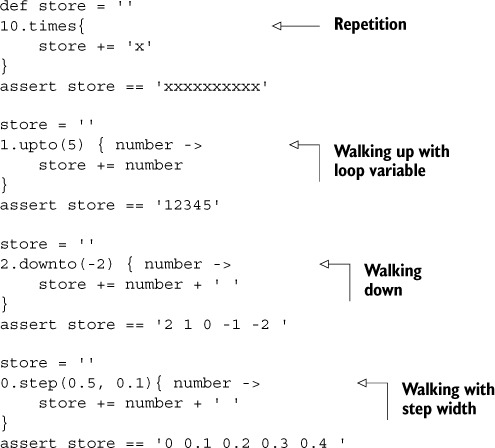
More interestingly, the GDK also defines the methods times, upto, downto, and step. They all take a closure argument. Listing 3.11 shows these methods in action: times is just for repetition, upto is for walking a sequence of increasing numbers, downto is for decreasing numbers, and step is the general version that walks until the end value by successively adding a step width.
Calling methods on numbers can feel unfamiliar at first when you come from Java. Just remember that numbers are objects and you can treat them as such. As you’ve seen, numbers in Groovy work in a natural way and protect you against the most common errors with floating-point arithmetic. In most cases, there’s no need to remember all details of coercion. When the need arises, this section may serve as a reference.
The strategy of making objects available in unexpected places starts to become an ongoing theme. You’ve seen it with numbers, and section 4.1 will show the same principle applied to ranges.

This is an excerpt from Manning's book Making Java Groovy: Foreword by Guillaume Laforge.
The first assert statement checks that the total number of rows in the table matches the number of stadiums in the collection. The next statement invokes the eachRow method on the connection, selecting just the latitude and longitude, and assigning the dummy variable row to each of the rows in the result set. The two contained assert statements verify that the latitudes are between 25 and 48 and that the longitudes are between -123 and -71.
Moving on to data types themselves, Java makes a distinction between primitives and classes. In Groovy there are no primitives. Numbers in Groovy are first-class objects, with their own set of methods.
Numbers without a decimal point are of type Integer, Long, or java.math.BigInteger, depending on size. Numbers with a decimal point are of type java.math.BigDecimal.
Because numbers are objects, they have methods as well. Listing B.2 shows a script putting some numbers through their paces. Several of the expressions use closures, which are the subject of section B.4. The simplest definition is to consider them a block of code that’s executed as though it’s an anonymous method call.
Listing B.2. numbers.groovy, showing method calls on numeric literals
assert 2**3 == 8 assert 2**-2 == 0.25 // i.e., 1/(2*2) = 1/4 def x = "" 3.times { x += "Hello" } assert x == "HelloHelloHello" def total = 0 1.upto(3) { total += it } assert total == 1 + 2 + 3 def countDown = [] 5.downto 1, { countDown << "$it ..." } assert countDown == ['5 ...', '4 ...', '3 ...', '2 ...', '1 ...']Groovy has an exponentiation operator, unlike Java. Numbers have methods like times, upto, and downto. The times operation takes a single argument of type Closure. When the last argument to a method is a closure, you can put it after the parentheses. Because the method has no other arguments, you can leave out the parentheses altogether.
That’s nearly 30 lines to do something extremely simple. All Java code has to be in a class with a main method. The input stream System.in is available, but I want to read a full line of data, so I wrap the stream in an InputStreamReader and wrap that in a BufferedReader, all so I can call readLine. That may throw an I/O exception, so I need a try/catch block for it. Finally, the incoming data is in string form, so I need to parse it before adding up the numbers and printing the results.
