concept hosted mode in category gwt

This is an excerpt from Manning's book GWT in Practice.
You can also use the hosted mode browser apart from the GWT shell���s Tomcat instance with the -noserver option. This tells the shell not to use the embedded Tomcat instance in hosted mode, but rather to use an external server that you specify. Using an external web server, or Java container, can have several advantages. You can, for example, use the standalone browser to debug and test Java UI code that is talking to PHP or .NET backends that can���t otherwise be run in the GWT shell. Or you can use a Java backend that may run in a different container than Tomcat. Using an external server with -noserver is covered further in chapter 3, when we look more closely at configuring the embedded Tomcat instance in general.
For example, if your library is a logging utility that makes calls back to the server side to record client-side activity, users who inherit your module will need to know about, and how to properly configure, the server-side service servlets and dependencies. This can be a good reason to use an automated build tool that can automatically set up dependencies and server-side resources (at least in hosted mode).
We first discussed Tomcat Lite, the embedded Apache Tomcat instance included in GWT, in chapter 3. There we discussed the issues surrounding the maintenance of multiple configuration files—one for the hosted mode and one for the web mode—and how to manage those configuration files so that your projects can make use of service-side features provided by the JEE container.
Tomcat Lite maintains its own set of context.xml (ROOT.xml in GWT terms) and web.xml configuration files. Obviously, the ideal deployment process would need to work both in hosted mode terms and in terms of creating a WAR file. This means what we really need is a context.xml file and a web.xml file, which are local source files for our project, and which get copied into and deployed with our WAR files and also are used in hosted mode.
Creating an automated build process that allows the inclusion of project-local configuration files (context.xml and web.xml) that are used both for creating WAR files and for automatically configuring Tomcat Lite has several advantages. First, you can maintain configuration information in one place, rather than in several. Second, you can use common JEE container-managed resources, such as servlet filters, security realms, and data sources in hosted mode. Third, if you import any module that includes servlet declarations, they are automatically available to your module without your having to just know about them and manually configure them. (This third point, and the fact that GWT testing, something we will discuss in the next chapter, needs the embedded Tomcat, are the main reasons not to abandon the embedded instance altogether.)
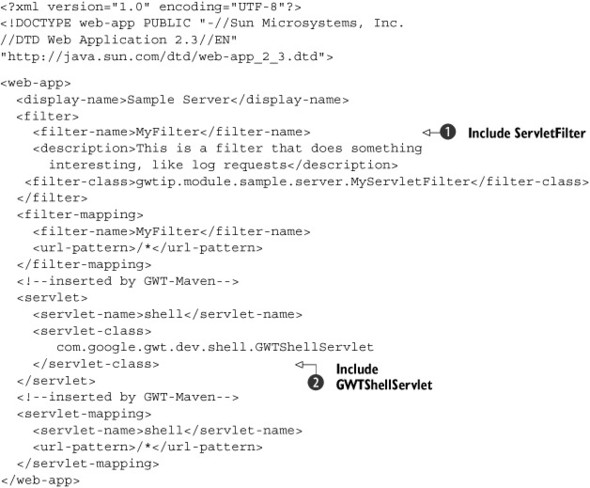
The only notable thing about the standard Tomcat Lite web.xml file, shown in listing 7.6, is that it has a servlet entry for GWTShellServlet
. In order to use something like our own filter from listing 7.5 within hosted mode, we basically need a combination of these files, as is shown in listing 7.7.
The combination of the project-specific web.xml file and the default GWT hosted mode web.xml file, as seen in listing 7.7, gives us a new file for use in hosted mode that enables our ServletFilter to be present
. This will ensure that our filter is there when our application runs in the shell.