concept file in category hadoop

This is an excerpt from Manning's book Hadoop in Practice, Second Edition.
Scalability and availability are also key traits of HDFS, achieved in part due to data replication and fault tolerance. HDFS replicates files for a configured number of times, is tolerant of both software and hardware failure, and automatically re-replicates data blocks on nodes that have failed.
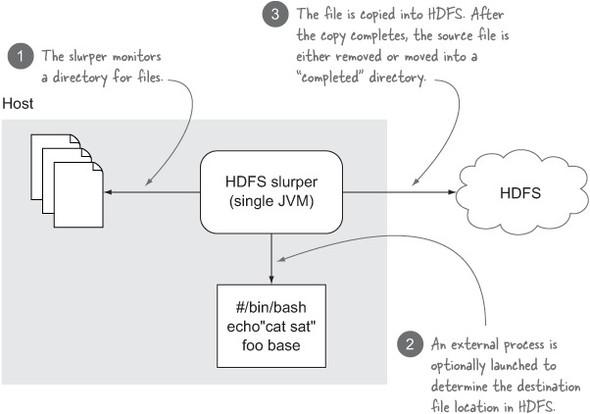
Figure 5.6 provides a high-level overview of the Slurper (my nickname for the project), with an example of how you can use it to copy files. The Slurper reads any files that exist in a source directory and optionally consults with a script to determine the file placement in the destination directory. It then writes the file to the destination, after which there’s an optional verification step. Finally, the Slurper moves the source file to a completed folder upon successful completion of all of the previous steps.
put: `hdfs-file.txt': File existsThe -f option must be added to force the file to be overwritten:
Files and directories that already exist in the destination are left untouched (even if the files are different). You can change this behavior by adding the arguments shown in table 5.3.
Table 5.3. DistCp arguments that impact where files are copied, and the behavior should destination files preexist
Argument
Description
None (neither -update nor -overwrite) Source files are never recopied if the destination already exists. -update Source files are recopied if any of the following are true: -overwrite Source files are always recopied if the destination file already exists.

This is an excerpt from Manning's book Hadoop in Action.
Look at the files in your output directory again. As we haven’t changed any program code, the result should be the same as before. We’ve only compiled our own copy rather than running the precompiled version.
Now that we have a working directory, we can put a file into it. Create some text file on your local filesystem called example.txt. The Hadoop command put is used to copy files from the local system into HDFS.
hadoop fs -put example.txt.Note the period (.) as the last argument in the command above. It means that we’re putting the file into the default working directory. The command above is equivalent to
We can use the Hadoop file command with Unix pipes to send its output for further processing by other Unix commands. For example, if the file is huge (as typical Hadoop files are) and you’re interested in a quick check of its content, you can pipe the output of Hadoop’s cat into a Unix head.
hadoop fs -cat example.txt | headHadoop natively supports a tail command for looking at the last kilobyte of a file.
hadoop fs -tail example.txtAfter you finish working with files in HDFS, you may want to delete them to free up space.