concept record in category hadoop
This is an excerpt from Manning's book Hadoop in Practice, Second Edition.
As shown previously, the TextInputFormat class creates a LineRecordReader to read records from the input splits. The LineRecordReader directly extends the RecordReader class and uses the LineReader class to read lines from the input split. The LineRecordReader uses the byte offset in the file for the map key, and the contents of the line for the map value. The following example shows a simplified version of the LineRecordReader (source at http://mng.bz/mYO7):
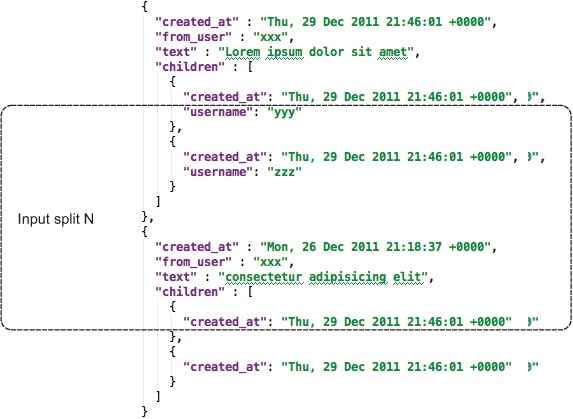
Figure 3.7 shows the problem with splitting JSON. Imagine that MapReduce created a split as shown in the figure. The map task that operates on this input split will perform a seek to the start of the input split, and then needs to determine the start of the next record. With file formats such as JSON and XML, it’s challenging to know when the next record starts due to the lack of a synchronization marker, or any other indicator that identifies the start of a record.
JSON is harder to partition into distinct segments than a format such as XML because JSON doesn’t have a token (like an end tag in XML) to denote the start or end of a record.
Mahout’s XMLInputFormat can be used to work with XML files in HDFS with MapReduce. It reads records that are delimited by specific XML begin and end tags. This technique also explains how XML can be emitted as output in MapReduce output.
This is an excerpt from Manning's book Hadoop in Action.
Provide an object (RecordReader) to iterate through records in a given split, and to parse each record into key and value of predefined types.
Figure 5.1. In repartitioned join, the mapper first wraps each record with a group key and a tag. The group key is the joining attribute, and the tag is the data source (table in SQL parlance) of the record. The partition and shuffle step will group all the records with the same group key together. The reducer is called on the set of records with the same group key.
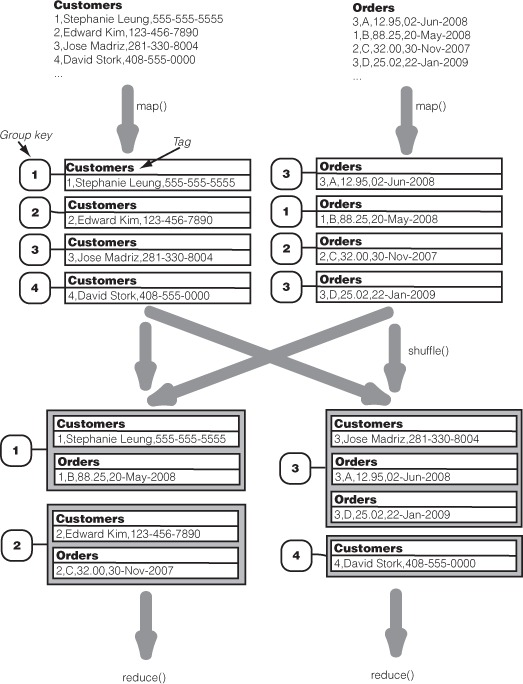
Recall that in the MapReduce framework, map() outputs records as key/value pairs that are partitioned on the key, and all records of the same key will end up in a single reducer and be processed together. For joining, we would want the map() function to output a record package where the key is the group key for joining—the Customer ID in this case. The value in this key/value package will be the original record, tagged with the data source (i.e., filename). For example, for the record
3,A,12.95,02-Jun-2008from the Orders file, map() will output a key/value pair where the key is "3", the Customer ID that will be used to join with records from the Customers file. The value output by map() is the entire record wrapped by a tag "Orders".
After map() packages each record of the inputs, MapReduce’s standard partition, shuffle, and sort takes place. Note that as the group key is set to the join key, reduce() will process all records of the same join key together. The function reduce() will unwrap the package to get the original record and the data source of the record by its tag. We see that for group keys (Customer IDs) "1" and "2", the reduce() function gets two values. One value is tagged with "Customers" and the other value is tagged with "Orders". For the map output with (group) key "4", reduce() will only see one value, which is tagged with "Customers". This is expected as there is no record in Orders with a Customer ID of "4". On the other hand, reduce() will see three values for the (group) key "3". This is due to one record from Customers and two more from Orders.
Our toy example has an implicit schema that Customer ID identifies a unique record in Customers, making the number of combinations in a cross-product always the number of Orders records with the Customer ID (except when it’s zero, in which case the cross-product is the Customers record itself). For more complicated settings, the number of combinations generated by the cross-product is the product of the number of records under each tag. If reduce() sees two Customers records and three Orders records together, then the cross-product will create six (2 * 3) combinations. If there’s a third data source (Accounts) with two records, then the cross-product will create twelve (2 * 2 * 3) combinations.
It feeds each combination from the cross-product into a function called combine(). (Don’t confuse with combiners as explained in section 4.5.) Due to the nature of the cross-product, combine() is guaranteed to see at most one record from each of the data sources (tags), and all the records it sees have the same join key. It’s the combine() function that determines whether the whole operation is an inner join, outer join, or another type of join. In an inner join, combine() drops all combinations where not all tags are present, such as our case with group key "4". Otherwise combine() merges the records from different sources into a single output record.
Now you see why we call this joining process the repartitioned sort-merge join. The records in the original input sources can be in random order. They are repartitioned onto the reducers in the right grouping. The reducer can then merge records of the same join key together to create the desired join output. (The sort happens but it’s not critical to understanding the operation.)