concept Bell in category hapi

This is an excerpt from Manning's book hapi.js in Action.
In this section we’re going to learn how to implement this functionality in our own web applications using a hapi plugin called Bell. I cover what third-party auth is all about and how Bell works. I finish up with a working example that can act as a template for your own applications.
We’re going to build a simple app to showcase Bell. It’s going to consist of a single page. When the user is logged out, they have the option to log in with Facebook. After successful login, they’ll be greeted with a message and a logout link. The flow of this app is shown in figure 9.6.
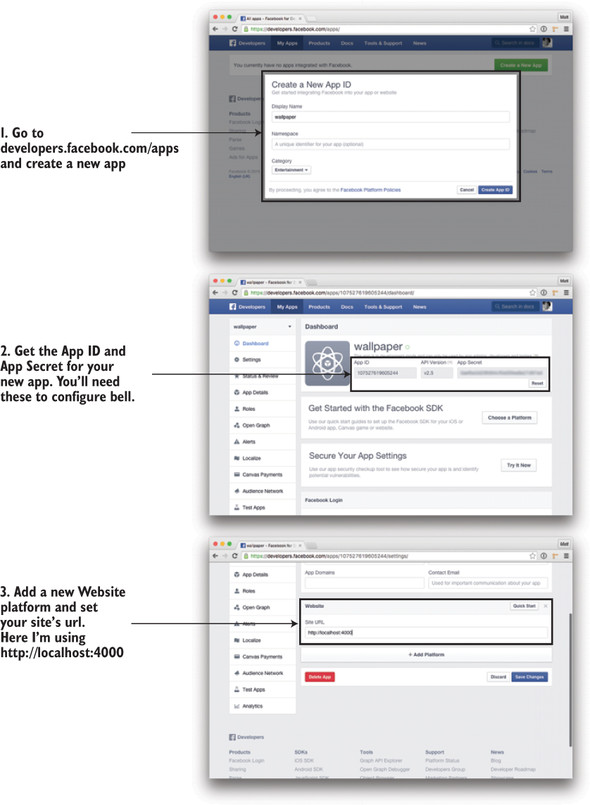
Before we can get started with our app, we need to create a Facebook application. This way we can get the necessary credentials that Bell needs to implement the OAuth flow with Facebook. This is pretty simple to set up, and the process will be similar across different providers (look up the developer’s documentation for your provider, if you’re not using Facebook). You will need a Facebook account first. The steps to set up a new Facebook application are outlined in figure 9.7. Please be aware that Facebook updates its app creation process quite frequently, so the exact pages and order of steps may be slightly different than those outlined here.