concept event in category hapi

This is an excerpt from Manning's book hapi.js in Action.
Good is a hapi plugin for monitoring and reporting on events that occur in your applications. There are several reporters available for Good, including console, HTTP, and UDP. You can also create your own reporters.
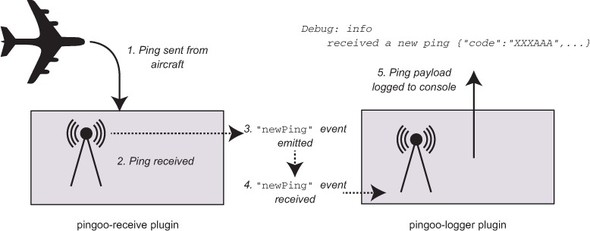
Remember that I mentioned that logging and server events were closely related? Well, it turns out that request.log() and server.log() are simple functions that cause a server object to emit request and log events respectively.
First up, before we start looking directly at how to manage logs with hapi, I want to discuss server events a little because the two subjects are closely linked. In chapter 7, we looked at using an EventEmitter object to communicate events across different parts of a hapi application built with plugins. We used this as an uncoupling strategy to ensure that our plugins were as isolated as possible. If you remember, EventEmitter is Node’s built-in implementation of the popular Observer pattern, as shown here.
A hapi server object emits nine different types of event types, listed in table 11.1. We’re only going to concern ourselves with the events in rows with grey backgrounds in this book.
Table 11.1. Server events
Event
Internal/User
Description
log Internal/User Generated by calling server.log() discussed in section 11.1.2 request User Generated by calling request.log() discussed in 11.1.2 request-error Internal Generated internally when a request sends back a 500 error request-internal Internal Generated internally by hapi on various stages of a request response Internal Emitted by server when a response is sent route Internal Emitted when a route is added to a server connection start Internal Generated when a server starts stop Internal Generated when a server stops tail Internal Emitted once a request has finished processing We can listen to these server events, as we would listen for events on any EventEmitter object, by using .on():
server.on('request-internal', (request, event, tags) => {

    console.log(event);
});
If you run an application with the previous code added, you’ll see a flurry of events streaming through your console when you make requests: