concept file in category hapi

This is an excerpt from Manning's book hapi.js in Action.
If you’ve built web applications, in any language or platform, you’ll know that what sometimes starts out as a simple vision can quickly become complicated. There are numerous things to consider when building a web app, including how to go about caching, validating, and authenticating. You also need to decide how to structure your code into files and directories in a way that makes sense.
If you use multiple parameters within a single segment, as in the preceding example, you must separate them with at least one valid character that isn’t a parameter. If you had a path such as /download/{file}{ext}, hapi wouldn’t know where to break the final segment into the file and the ext parameters, because there’s no separator.
Listing 4.21. POST route for uploading files with the default payload configuration
server.route({ method: 'POST', path: '/upload', handler: function (request, reply) { ... }, config: { payload: { output: 'data', parse: true } } });hapi will parse multipart/form-data requests by default. But the way you work with the data from the files varies, depending on the value of the payload.output option in the configuration for the route. We’ll look now at the available options using the HTML form in the following listing as an example for each option.
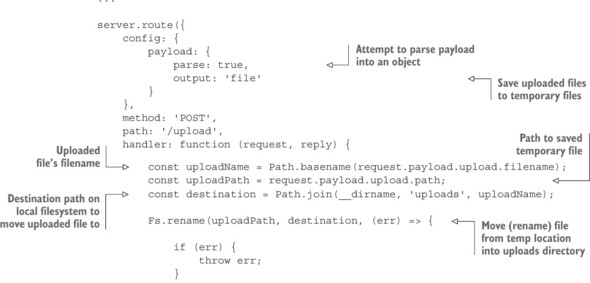
When using the file option, hapi will save any files uploaded through a multipart form directly to the filesystem as temporary files and provide some information, including the file path, inside the request.payload object. Once again, any text fields will be available as strings, as with the other options discussed earlier.
The typical pattern is to move this temporary file to its intended, final location inside your route handler. The following listing shows the example from earlier, adapted for the file option.