concept Glue in category hapi

This is an excerpt from Manning's book hapi.js in Action.
This approach is neither scalable nor pretty. Once you start looking at plugin loading situations like this, with many options or complex configuration needs, it’s time to take a look at Glue.
We’ll now use Glue to replace the boilerplate code currently sitting in the index.js file of our Pingoo application. Let’s first take another look in the following listing at that index.js file so we can see a side-by-side comparison of the end result.
Listing 7.13. Pingoo: index.js
const Hapi = require('hapi'); const server = new Hapi.Server({ debug: { request: ['error'], log: ['error'] } }); server.connection({ port: 4000 }); server.register([ { register: require('./plugins/database'), options: { dbName: 'pingoo', dbTable: 'pings' } }, { register: require('./plugins/portal') }, { register: require('./plugins/receive') }, { register: require('vision') } ], (err) => { if (err) { throw err; } server.start((err) => { if (err) { throw err; } console.log('Server started at: ' + server.info.uri); }); });What Glue does is write the code in our index.js for us, based on our manifest. This is explained in figure 7.6.
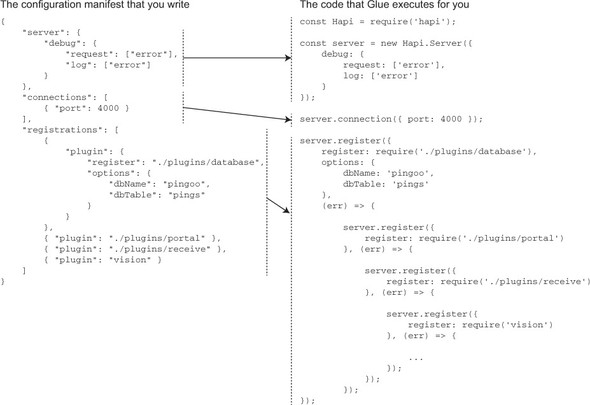
Glue is a utility designed for use with hapi (it’s not a hapi plugin, but a normal package from npm) that does this legwork for us. It lets you define an entire application in a configuration object called a manifest. A manifest is nothing special—it’s a plain-old JavaScript object with a specific set of properties. Glue takes a manifest and builds a server with all the connections and plugins loaded how you specified. It’s pretty awesome to see it in action. Let’s see an example.
To get started with Glue, add it to your project as a dependency: