concept request in category hapi

This is an excerpt from Manning's book hapi.js in Action.
Routes in hapi are your way of telling the framework that you’re interested in certain types of requests. You create a route with a set of options, including the HTTP verb (such as GET, POST, and PATCH) and path (for example /about) that you want to respond to, and add it to a server.
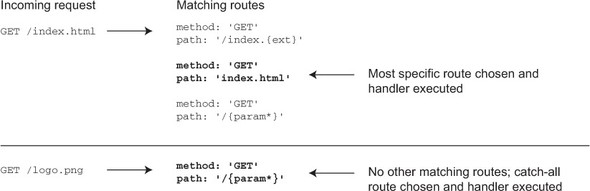
When a new request arrives at your server, hapi will attempt to find a route that matches the request. If it successfully pairs the request with one of your routes, it will look to your route handler for how to handle the request.
Each page and action on the website will have a corresponding hapi route. For instance, the home page will have a route that matches GET requests to /. In response, hapi will send back the HTML that represents the page, and the browser will then render the page, also downloading any additional assets like Cascading Style Sheets (CSS) styles or images. This works similarly to how we built an API with hapi, except rather than using JSON, we’re now responding with HTML and static files.
We’ll see other new things in this chapter, such as how to maintain state between requests with cookies and sessions, perform redirects, and work with form data. Nevertheless, the core principles are the same: We create and configure a server, set up routes, and define handlers to manage requests.
When a request comes into hapi for the logo image with a path of /images/logo.png, hapi will try to find a route that matches the path specifically. If one isn’t found, hapi will match the catch-all route shown in listing 3.6. hapi will then search in the specified directory (public) for a file with the path ./images/logo.png. As this file exists, hapi will serve it in response.