concept route in category hapi

This is an excerpt from Manning's book hapi.js in Action.

In this chapter we’ll take an in-depth look at two of the most important concepts in hapi: routes and handlers. Routes are how you tell hapi what kind of requests you’re interested in. Handlers are how you choose to respond to those routes. Having a mastery of these two will greatly broaden the types of applications you can create with hapi.
All of the routes that you add using server.route() get added internally to something called the routing table. Each server connection has its own copy of the routing table, illustrated in figure 4.1.
Remember, a connection, in hapi terms, is something that associates a hapi server with a physical port and network interface on your computer. We create connections using server.connection(). If you add a route to a server with server.route(), hapi will add an entry into the routing table for all the server’s associated connections.
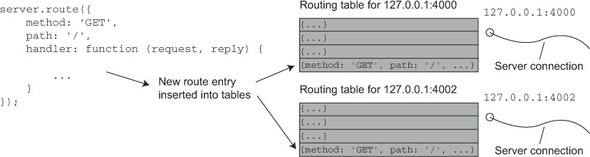
When you add a new route, the router will split the route’s path into segments and analyze each one. Each segment will be categorized. Here are some example paths and their categorization—these are all valid and non-conflicting routes within the same routing table:
Path: /document Segments: document ^ literal Path: /document/{id} Segments: document, {id} ^ literal ^ param Path: /document/{id}.xml Segments: document, {id}.xml ^ literal ^ mixed Path: /document/{path*} Segments: document, {path*} ^ literal ^ wildcardliteral, param, mixed, and wildcard are all types of segments. This segment-by-segment analysis of each path is stored in the routing table and used when matching an incoming request to a route.