concept custom bridge in category hibernate

This is an excerpt from Manning's book Hibernate Search in Action.
Because everything is a string in Lucene, comparisons can be a bit surprising at times. For example, the number 2 is higher than 12. This is why numbers are marked as not comparable in table 3.1. We’ll find a way to bring back sanity to number comparison in the next chapter when we talk about custom bridges. When using comparisons, always be aware of how the bridge stores data in the index, and remember that it will end up being a string comparison.
Custom bridges are the most popular extension point of Hibernate Search. While in most situations you won’t need to use custom bridges, they’ll soon become an essential tool for mapping exotic domain models. You might feel right now that this puts too much power in your hands, that you don’t need such flexibility (and in a lot of cases you’ll be right), but after reading chapters 6 and 7 on queries, you’ll need to bend the index structure to suit your needs in order to make the most of your full-text queries. Bridges will be there for you.
Like any other mapping declaration in Hibernate Search, annotations are the way to use a custom bridge.
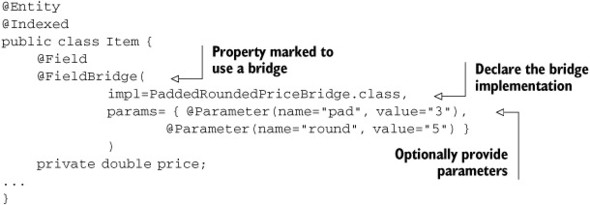
The @FieldBridge annotation is placed on a property (field or getter) that needs to be processed by a custom bridge (see listing 4.1). Optional parameters can be passed to the bridge implementation.