concept number in category hibernate

This is an excerpt from Manning's book Hibernate Search in Action.
Date is one example. When doing a search query on a date or date range, we don’t always need the date with its full precision up to the millisecond. Perhaps providing a way to store only the date up to the day or the hour could make sense. Date is not the only type with problems; number is another one. When comparing numbers, mathematical common sense tells us that 23 is lower than 123. Not for Lucene! Remember, everything is a string, and in the string world, 23 is indeed higher than 123 because the lexical order of 2 is higher than 1. Beyond built-in Java types, custom classes like Address or MoneyAmount also have to be somewhat translated into a string representation in the index.
A category filter restricts some categories to customers. Because the number of categories is limited, Hibernate Search can cache the DocIdSet for each category.
Limit the number of targeted classes. Limit the number of clauses in your Lucene query. Use pagination to limit the number of objects loaded.
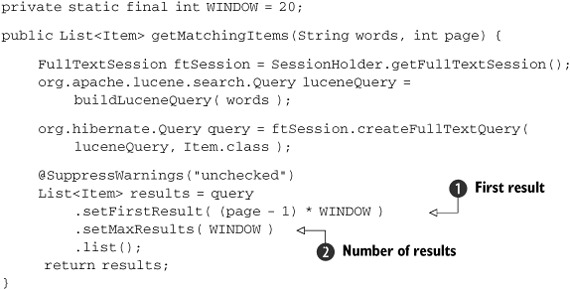
The first trick is to not load information you don’t need. Why would you load 1000 objects if your customer looks at only the first 20 elements 95 percent of the time? The process of limiting the number of matching results returned is called pagination. Not only does it limit the number of domain model objects loaded by Hibernate Search, it also limits the number of Document objects loaded by Lucene. Listing 9.6 shows pagination used to display Item objects by batches of 20.
When paginating, you define the first element retrieved
(the first element of the page in this case) and the number of elements retrieved
. Section 6.4 has more in-depth information about pagination.