concept query in category hibernate

This is an excerpt from Manning's book Hibernate Search in Action.
If we were using SQL as our search engine, we would have to write a lot of the searching logic by hand. Not only would it be reinventing the wheel, but very likely our wheel would look more like a square than a circle. Searching takes a query from a user and returns the list of matching results efficiently and ordered by relevance. Like indexing, searching is a multistep process, as shown in figure 1.7. We’ll walk through the steps and see how they solve the problems we’ve seen during the development of our SQL-based search engine.
Figure 1.7. Searching process. From a user or program request, determine the list of words, find the appropriate documents matching those words, eliminate the documents not matching, and order the results by relevance.

The first operation is about building the query. Depending on the full-text search tool, the way to express query is either:
Let’s face it. Queries can be as simple as a single word and as complicated as a multiword, nested Boolean expression with a range query added on, and so on, up to the limits of your imagination. A semi-mathematical style of notation can make things a little easier to understand, and that’s what Lucene uses. A small set of special characters can convey a lot of information accurately.
Understanding the query syntax is of the utmost importance if you’re going to troubleshoot a query that didn’t produce expected results. Is the problem in the index or the query? You don’t want to waste time barking up the wrong tree.
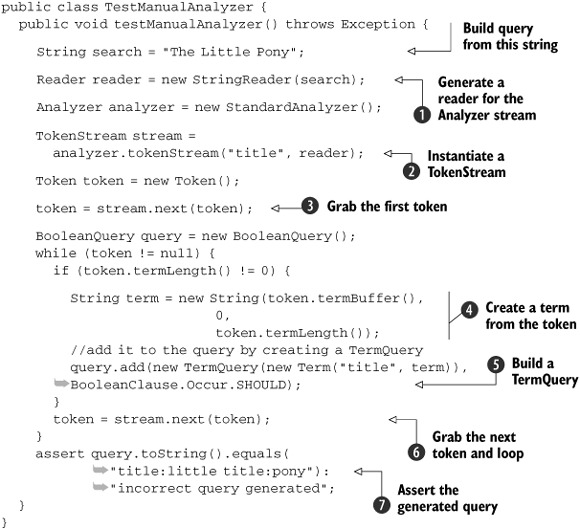
Some query types allow the application of an analyzer out of the box. At the same time, many more queries don’t allow it. This section demonstrates how to apply an analyzer to a query by taking a query string and manually applying a StandardAnalyzer analyzer to it. This enables you to apply whatever analyzers you wish to a multifield query and combine them into a BooleanQuery query. Listing 7.3 shows how to do this.
Listing 12.18. The term frequency and position results of the query in listing 12.17
0.5036848 docID# =>2 term => electrical freq => 1 position => 0 starting offset => 0 ending offset => 10 --------------- docID# =>2 term => measurable freq => 1 position => 2 starting offset => 26 ending offset => 36 --------------- docID# =>2 term => properties freq => 2 position => 1 starting offset => 11 ending offset => 21 position => 3 starting offset => 37 ending offset => 47 --------------- 0.35615897 docID# =>1 term => electrical freq => 1 position => 0 starting offset => 0 ending offset => 10 --------------- docID# =>1 term => interesting freq => 1 position => 2 starting offset => 26 ending offset => 37 --------------- docID# =>1 term => properties freq => 1 position => 1 starting offset => 11 ending offset => 21 --------------- 0.3116391 docID# =>0 term => electrical freq => 2 position => 0 starting offset => 0 ending offset => 10 position => 3 starting offset => 29 ending offset => 39 --------------- docID# =>0 term => engineers freq => 1 position => 1 starting offset => 11 ending offset => 20 --------------- docID# =>0 term => measure freq => 1 position => 2 starting offset => 21 ending offset => 28 --------------- docID# =>0 term => properties freq => 1 position => 4 starting offset => 40 ending offset => 50 ---------------