concept browser in category ionic

This is an excerpt from Manning's book Ionic in Action: Hybrid Mobile Apps with Ionic and AngularJS.
Cross-platform— Any mobile device has a browser, allowing your application to be accessible from any device.
In this section you’ll get the essential development environment set up, set up your first app, and preview the app in a browser. Because you’re building a hybrid app, the browser is the easiest way to preview it.
The majority of your development time will be spent using the browser for previewing and developing your app. As your app matures, you’ll likely begin to use an emulator to simulate a real mobile device, or build the app on a connected mobile device. Figure 2.2 shows a typical workflow during development, and this section covers the browser preview, while the next section covers the other two options.

You can preview your app in the browser, which makes it very easy to debug and develop without having to constantly build the project on a device or emulator. Typically you’ll develop your app using this technique, and then test in the emulator and on a device when the app is more complete. The following command will start a simple server, open the browser, and even autorefresh the browser when you save a file change:
$ ionic serveIt may prompt you to choose an address, and in most cases you should select localhost. It will open the default browser on your computer on port 8100. You can visit http://localhost:8100 in any browser, but it’s best to preview using a browser used by the platform you’re targeting because that’s the browser the WebView uses.
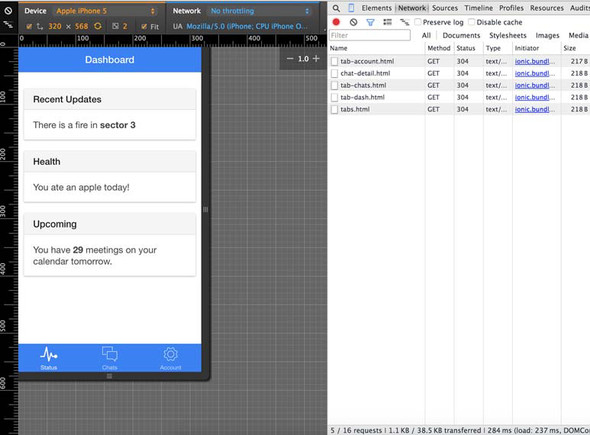
Because you’re viewing the app in a browser, you have access to the developer tools you’d use for building websites. As you develop, you’ll want to have the developer tools open to aid in development and debugging, as you see in figure 2.4.
The browser on your mobile device, and used in the WebView, isn’t identical to the browser on your computer. But they’re certainly related and tend to support the same general features.