concept plugin in category ionic

This is an excerpt from Manning's book Ionic in Action: Hybrid Mobile Apps with Ionic and AngularJS.
Access native features via plugins— Access to the native APIs you need may not be currently available, and may require additional development to make a plugin to support it.
Plugins are installed through the command line. You can search on the plugins site at http://plugins.cordova.io or search for plugins from the command line. You can use the command-line search to find notification plugins like this:
$ cordova plugin search notificationThis will return a list of any plugins that are related to notifications. It will provide the plugin identifier and a short description, and you’ll use the plugin identifier when you wish to install the plugin. Ionic includes several by default, such as org.apache.cordova.device and com.ionic.keyboard. Here’s how you’d install the official Cordova notification plugin:
$ cordova plugin add org.apache.cordova.dialogsIt will fetch the latest plugin and add it to your plugins folder. You only need to do this once per plugin, per project. When you build the project (which happens before you emulate or run it on any device), it will automatically pull in the installed plugins. You can review the installed plugins by looking at your plugins folder.

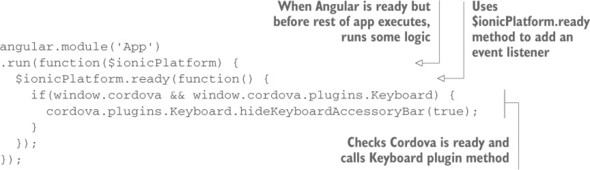
Before selecting and using a plugin, you should consider if a plugin is even necessary. Sometimes features are available in the browser without a plugin, such as basic network connection details, so it’s unnecessary to add the connection plugin for Cordova. Many plugins were created in the past to add features that were missing at the time from browsers, but as platforms advance, more features may be native to a browser.