concept tab in category ionic

This is an excerpt from Manning's book Ionic in Action: Hybrid Mobile Apps with Ionic and AngularJS.
Ionic— This provides the user interface components rendered in the app. Ionic is built on top of Angular, and is primarily used to design the user interface and experience. This includes the visual elements such as tabs, buttons, and navigation headers. These interface controls are the heart of Ionic, and provide a near-native interface inside of a hybrid app. Ionic also includes a number of additional utilities and features that help manage your app from creation to previewing to deployment.
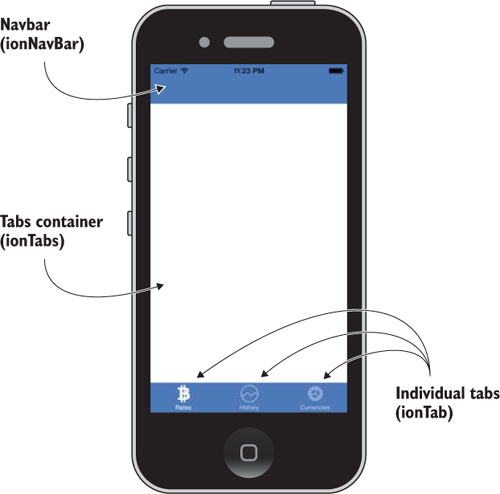
Tabs are very common in mobile apps, and Ionic provides a feature-rich component for you to create them quickly. Tabs are commonly used to show a visual connection between several views. There’s no actual limit on the number of tabs you could use, but typically two to five tabs are used due to the limited space available. Tabs can be used nearly anywhere in your app, except inside of an ionContent directive due to a CSS collision that can occur when ionTabs is placed inside ionContent.
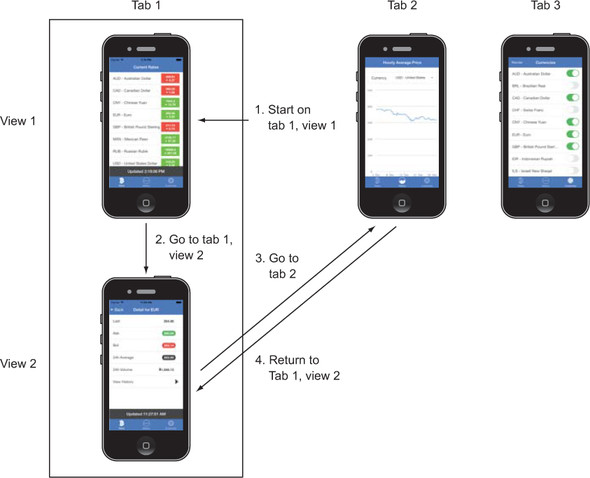
Your tabs are empty, and you want to use additional ionNavView components to load your components. This will allow each of the tabs to maintain its own navigational history. It allows you to use a back button that’s only for a given tab instead of the whole app. In figure 5.3 you can see how the user experience would flow with each tab having its own navigational history. If you’re following along using Git, you can check out the code for this step:
$ git checkout –f step3Tabs don’t require individual views
Tabs can contain any content you wish to put inside. Essentially a tabbed interface is really just one large view that has only one tab displayed at once, with the other tabs in a hidden state. It would be similar to having several pages of paper stacked on top of one another, and at any time you can move a lower page to the top so it’s visible.
Your first task is to add in the base navigational elements: the ionNavBar and ionNavView components. ionNavBar will be useful to dynamically update the title bar depending on the tab you’re using, and ionNavView will contain the tabs template. You saw these two working in the chapter 4 app, so refer back if you need a refresher on their purpose. If you’re following along using Git, you can check out the code for this step: