concept banner view in category ios

This is an excerpt from Manning's book iOS 4 in Action: Developing iPhone and iPad Apps.
Before you start to code, let’s spend some time together on the banner advertisement structure. First, you need to provide some space for the banner image view in your application’s user interface, roughly 10% of the screen size. For example, the banner view under portrait mode on iPhone is 320 × 50 points (pt) in size, and portrait mode on the iPad is 768 × 66 pt. Ad sizes based on device and screen orientation are described in detail in table 20.1.
It’s time to add in the banner view. Single-click the MyAppViewController.h file, and add the header file for iAd framework:
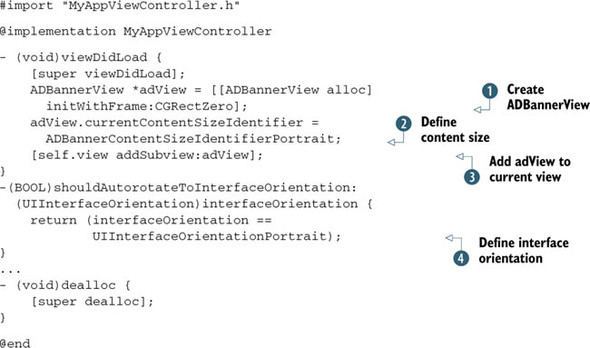
Let’s go through the changes. Inside the viewDidLoad method, you create a banner view
, and then you define the content size to be portrait (320 × 50 on iPhone, 768 × 66 on iPad)
. Finally, you add the banner view to the view controller’s view hierarchy
. In order to define the interface orientation as portrait mode only, you define the interfaceOrientation
. Save all the changes.