concept breakpoint in category ios
This is an excerpt from Manning's book Hello! iOS Development.
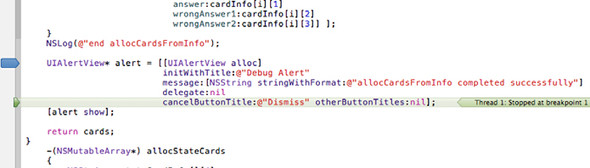
Breakpoints allow you to pause a program so you can examine variables. If a program isn’t working as expected, it’s useful to make sure the variables have the values you expect. Breakpoints are like giant stop signs that tell Xcode to stop executing and wait. To set a breakpoint, click the gutter to the left of the code, and Xcode will mark the line with a dark-blue arrow. This arrow informs you that Xcode will pause before this line is executed. Clicking an existing arrow toggles individual breakpoints on and off. Disabled breakpoints are translucent.
Try placing a breakpoint next to the line that creates the alert you added in the last section, and then run your app. When Xcode stops at the breakpoint, it accentuates the point of execution by highlighting the relevant line.
When you’re writing a complicated program, it’s sometime hard to tell if a particular line of code is being executed. Breakpoints are one way to check on a section of code. You can place as many breakpoints as you want. If the debugger doesn’t stop on your breakpoint, it means that line isn’t being run.


This is an excerpt from Manning's book iOS Development with Swift.
Table 1.4. Navigators
Navigator
Icon
Description
Project Navigator Manage and navigate to files in your project Source Control Navigator Manage your project’s source control repository Symbol Navigator Convenient way to navigate to classes, functions, and other objects in your project Find Navigator Find text anywhere in your project Issue Navigator Information on any current build warnings or build errors Test Navigator Information on any current unit tests or UI tests Debug Navigator Information on the current state of an app when execution is paused Breakpoint Navigator Navigate to and modify breakpoints Log Navigator A log of past builds of your app


Add a breakpoint to your code after setting the bookToSave variable in the touchSave method in BookViewController. Adding a breakpoint is simple; click to the left of the line where you want execution to be paused. A dark blue pointed rectangle should appear where you clicked, indicating an active breakpoint (see figure 15.11). Another place that could be interesting to analyze is when a view is loaded and the BookViewController class receives a Book object to edit.

This is an excerpt from Manning's book Objective-C Fundamentals.
While testing an application, it’s common to want to investigate the behavior of a specific section of source code. Before you launch the application, it can be handy to configure the debugger to automatically pause execution whenever these points are reached. You can achieve this through the use of a feature called breakpoints.
A breakpoint indicates to the debugger a point in the source code where the user would like to automatically “break into” the debugger to explore the current value of variables, and so on.
For the Coin Toss game, let’s add a breakpoint to the start of the simulateCoinToss: method. Open the CoinTossViewController.m file and scroll down to the source code implementing the simulateCoinToss: method. If you then click the left margin beside the first line, you should see a little blue arrow appear, as shown in figure 1.13.
Figure 1.13. Setting a breakpoint to break into the debugger whenever the first line of the simulateCoinToss: method is called. Notice the arrow in the margin indicating an active breakpoint.

The blue arrow indicates that this line has an enabled breakpoint. If you click the breakpoint, it becomes a lighter shade of blue, indicating a disabled breakpoint, which causes the debugger to ignore it until it’s clicked again to re-enable it. To permanently remove a breakpoint, click and drag the breakpoint away from the margin. Releasing the mouse will show a little “poof” animation, and the breakpoint will be removed.
RentalManager (4888) malloc: *** mmap(size=16777216) failed (error code=12)
*** error: can't allocate region
*** set a breakpoint in malloc_error_break to debug