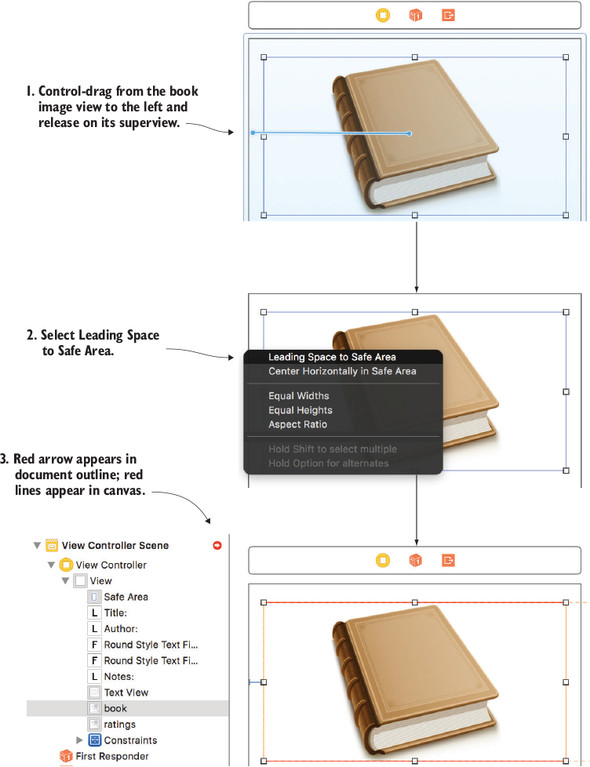
concept constraint in category ios
appears as: constraints, constraints, constraint

This is an excerpt from Manning's book iOS Development with Swift.
Table 1.5. Storyboard elements
Element
Description
View controller Manager for a scene’s views. View Visual components of your interface. Safe area An area of the root view that you can be confident is not obstructed by special views such as navigation bars. You can use safe area layout guides to help you lay out your views. (More on the safe area when we discuss auto layout in chapter 5.) Constraint Rules that define the layout of the views in a scene. (We’ll discuss constraints more in chapter 5, too.) Gesture recognizers Helpers that detect common gestures. (We’ll come back to these when we discuss user interaction in chapter 4.) First responder A first responder is the view in your scene that will be the first to receive any app events. Tapping on a text field, for example, will make it first responder. Use the first responder icon in Interface Builder to connect an action from a control to an action on the current first responder. Exit Customize behavior when exiting a scene. We’ll explore this further when we learn about navigation in chapter 9. Storyboard entry point Indicates the initial scene for the storyboard.
Pass an array of constraints into NSLayoutConstraint’s activate method: NSLayoutConstraint.activate(constraints)
Constraints are the rules that describe a layout in auto layout, and can be defined in Interface Builder or in code.