concept flipside controller in category ios

This is an excerpt from Manning's book iOS 4 in Action: Developing iPhone and iPad Apps.
Table 5.1. There are a variety of view controllers, giving you considerable control over how navigation occurs in your program.
As we’ve already noted, we’ll be discussing these view controllers in two different chapters. Here, we’ll look at the single-page view controllers: UIViewController and UITableViewController. In chapter 7, we’ll examine the multipage view controllers: UITabBarController, UINavigationController, and the flipside controller. This is a clear functional split: the single-page controllers exist primarily to support the controller role of the MVC model, whereas the multipage controllers exist primarily to support navigation and may even delegate MVC work to a simpler view controller lying below them. (As for the modal controllers, we’ll get to them when we cover the appropriate topics in chapters 8 and 11.)
To create a flipside controller on iPhone, choose the Utility Application template when you start a new project. Please note that this template is only available to the iPhone platform. It creates a small hierarchy of objects, as shown in figure 7.8.
The flipside controller contains three view controllers and two views. Each of the view controllers is a subclass of UIViewController, whereas the views are each a subclass of UIView.
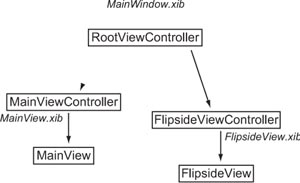
Given that, how do you use the flipside controller? All you need to do is lay out objects in the two .xib files and/or make changes to their accompanying class files. Then, you can build controller actions, events, and other activities into the two controller files.
For example, you can make your main view red; then, you can go into the FlipsideViewController.m file and change the default background color to green-Color (instead of its current flipsideColor) to create a simple red and green flash-card, which can be used to express your interest in a conference topic. We’ll also show you how to use a flipside controller to create local preferences on the back side of your program in chapter 8, section 8.2.1. If you ever need a two-sided application, the flipside controller is a great place to get started.
This is an excerpt from Manning's book iPhone and iPad in Action: Introduction to SDK Development.
Table 5.1. There are a variety of view controllers, giving you considerable control over how navigation occurs in your program.
Object
Type
Summary
UIViewController View controller A default controller, which controls a view. Also the basis for the flipside controller, which appears only as an Xcode template, not as a UIKit object. UIView View Either your full screen or some part thereof. This is what a view controller controls, typically through some child of UIView, not this object itself. UITableViewController View controller A controller that uses UITableView to organize data listings. UITableView View A view that works with the UITableViewController to create a table UI. It contains UITableCells. UITabBarController View controller A controller that works with a UITabBar to control multiple UIViewControllers. UITabBar View A view that works with the UITabBarController to create the tab bar UI. It contains UITabBarItems. UINavigationController View controller A controller used with a UINavigationBar to control multiple UIViewControllers. UINavigationBar View A view that works with UINavigationController to create the navigation UI. Flipside controller View controller A special template that supports a two-sided UIViewController. ABPeoplePickerNavigationController
ABNewPersonViewController
ABPersonViewController
ABUnknownPersonViewController
UIImagePickerControllerView controller Modal view controllers that allow interaction with sophisticated user interfaces for the Address Book and the photos roll. As we’ve already noted, we’ll be discussing these view controllers in two different chapters. Here, we’ll look at the single-page view controllers: UIViewController and UITableViewController. In chapter 7, we’ll examine the multipage view controllers: UITabBarController, UINavigationController, and the flipside controller. This is a clear functional split: the single-page controllers exist primarily to support the controller role of the MVC model, whereas the multipage controllers exist primarily to support navigation and may even delegate MVC work to a simpler view controller lying below them. (As for the modal controllers, we’ll get to them when we cover the appropriate topics in chapters 8 and 11.)
To create a flipside controller, choose the Utility Application template when you start a new project. It creates a small hierarchy of objects, as shown in figure 7.8.
The flipside controller contains three view controllers and two views. Each of the view controllers is a subclass of UIViewController, whereas the views are each a subclass of UIView.

Given that, how do you use the flipside controller? All you need to do is lay out objects in the two .xib files and/or make changes to their accompanying class files. Then, you can build controller actions, events, and other activities into the two controller files.
For example, you can use Interface Builder to make your main view red; then, you can go into the FlipsideViewController.m file and change the default background color to greenColor (instead of its current flipsideColor) to create a simple red and green flashcard, which can be used to express your interest in a conference topic. We’ll also show you how to use a flipside controller to create local preferences on the back side of your program in chapter 9. If you ever need a two-sided application, the flipside controller is a great place to get started.

This is an excerpt from Manning's book iPhone in Action: Introduction to Web and SDK Development.
Table 13.1. There are a variety of view controllers, giving you considerable control over how navigation occurs in your program
As we’ve already noted, we’ll be discussing these view controllers in two different chapters. Here we’re going to look at the single-page view controllers: UIViewController and UITableViewController. In chapter 15, we’re going to look at the multi-page view controllers: UITabBarController, UINavigationController, and the flipside controller. This is a clear functional split: the single-page controllers exist primarily to support the controller role of the MVC model, whereas the multipage controllers exist primarily to support navigation, and may even delegate MVC work to a simpler view controller lying below them. (As for the modal controllers, we’ll get to them when we cover the appropriate topics in chapters 16 and 18.)
To create a flipside controller, choose the Utility Application template when you start a new project. It will create a small hierarchy of objects, as shown in figure 15.7.
The flipside controller contains three view controllers and two views. Each of the view controllers is a subclass of UIViewController, while the views are each a subclass of UIView.
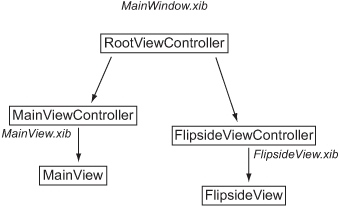
Given that, how do you actually use the flipside controller? All you need to do is lay out objects in the two .xib files and/or make changes to their accompanying class files. Then you can build controller actions, events, and other activities into the two controller files.
For example, you could use Interface Builder to make your main view red; then you could go into the FlipsideViewController.m file and change the default background color to greenColor (instead of its current flipsideColor) to create a simple red and green flash card, which can be used to express your interest in a conference topic. We’ll also show how to use a flipside controller to create local preferences on the backside of your program in chapter 16. If you ever need a two-sided application, the flipside controller is a great place to get started.