concept new class in category ios

This is an excerpt from Manning's book Objective-C Fundamentals.
For now, let’s focus on understanding the general structure of an Objective-C–based project. Objective-C is an object-oriented language, meaning that a large portion of your coding efforts will be spent defining new classes (types of objects). Listing 1.1 defines a new class called CoinTossViewController. By convention, the definition of a class is kept in a header file that uses a *.h file extension.
To put the concepts into context, we concentrate on updating the Rental Manager application to use object-oriented design principles, replacing the Rental-Property structure with a class that provides equivalent functionality. The new class will store and maintain the details of a single rental property, which means you must specify what data each object should keep track of and add instance and class methods to allow safe and controlled access to that data.
The easiest way to create a new class in Xcode is to select the New File menu option (Cmd-N). The New File dialog is displayed in figure 5.1.

This is an excerpt from Manning's book iOS 4 in Action: Developing iPhone and iPad Apps.
You now have two parts of a puzzle: how to create new classes of objects and how to send messages among instantiated objects. What you’re missing is how to instantiate an object from a class.
First, let’s work on how to create a custom class together with Xcode. New programs are usually full of new classes. Here are three major reasons you may want to create new classes:
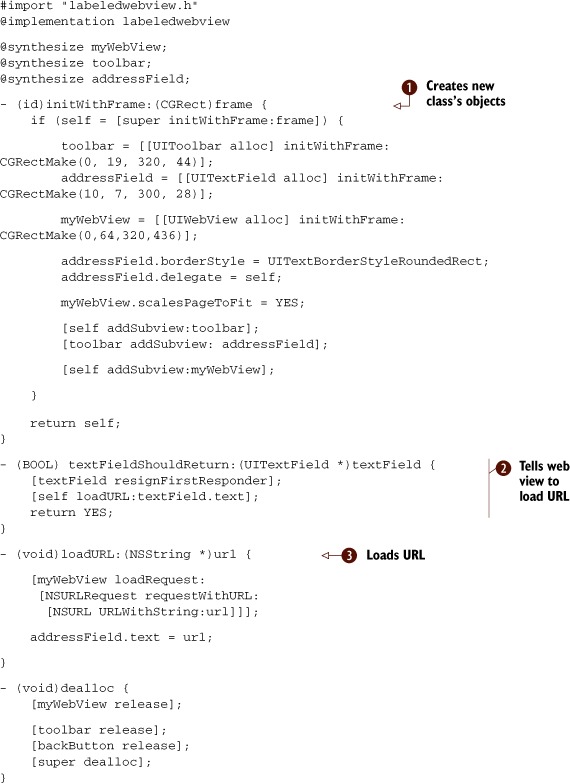
Creating a new class isn’t enough: you also need to use it. Add the bolded code in the following listing into the application delegate (NewClassAppDelegate.m) to use your new subclass.
Listing 4.3. Using the new class in the app delegate file
#import "NewClassAppDelegate.h" #import "LabeledWebView.h" @implementation NewClassAppDelegate @synthesize window=_window; - (BOOL)application:(UIApplication *) applicationdidFinishLaunchingWithOptions: (NSDictionary *)launchOptions { LabeledWebView *myBook = [[LabeledWebView alloc] initWithFrame:[[UIScreen mainScreen] bounds]]; [myBook loadURL:@"http://www.manning.com/jharrington/"]; [myBook setBackgroundColor:[UIColor clearColor]]; [_window addSubview:myBook]; [myBook release]; [self.window makeKeyAndVisible]; return YES; } ...
When you have your new project going, the process of creating a new class (see table 4.1) is simple, with Xcode doing most of the work for you in creating the file.
Table 4.1. Three steps to create a new class in Xcode
Step
Description
1. Create your new file. Choose File > New File. Choose the class to use as your parent from among the Cocoa Touch Classes options. Select a filename, preferably an intuitive name reflecting your object. When a subclass prompt window shows up, choose the subclass if there is one. Xcode should automatically create the header and source code files. 2. Modify your files. If you weren’t able to select your preferred class to subclass, change that now by modifying the parent class in the @interface line of the header file. 3. Import your object. Add an #import line for your class’s header in whatever file will be using it.
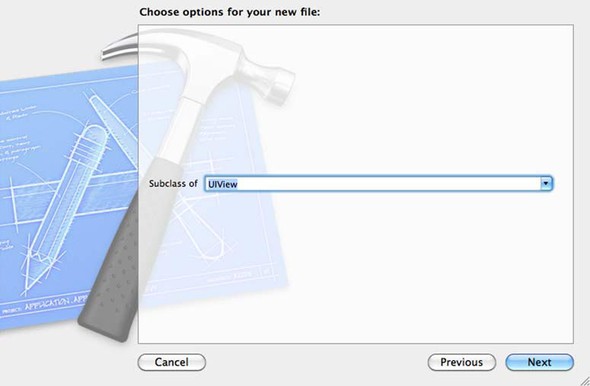
After clicking the Next button, you’ll be presented with a screen to select what class the new class is inheriting from (see figure 4.2). Under the Subclass drop-down menu, choose UIView as the subclass option for the new class, and then click Next.
When the Save window appears, type in the name of the new class. In this example, use LabeledWebView.

This is an excerpt from Manning's book iPhone and iPad in Action: Introduction to SDK Development.
You now have two parts of a puzzle: how to create new classes of objects and how to send messages among instantiated objects. What you’re missing is how to instantiate an object from a class.
Now that you’ve learned a bit about the puzzle pieces needed to build an SDK program, you’re ready to start programming. The main purpose of this chapter is to show you how Xcode, the SDK’s main development environment, works. Via a traditional Hello, World! program, we look at the parts of a standard SDK program. You’ll build it first for the iPhone and then build it again for the iPad so you can see how to construct a basic application for either device. We also examine how to create new classes of objects; and with that under your belt, we finish up by looking at some of Xcode’s most interesting features.
New programs are usually full of new classes. Here are three major reasons you may want to create new classes:

This is an excerpt from Manning's book iPhone in Action: Introduction to Web and SDK Development.
We’ve now got two parts of a puzzle: how to create new classes of objects and how to send messages among instantiated objects. What we’re missing is how to instantiate an object from a class.
Now that you’ve learned a bit about the puzzle pieces needed to build an SDK program, you’re ready to start programming. The main purpose of this chapter is to show you how Xcode, the SDK’s main development environment, works. Via a traditional Hello, World! program, we’ll look at the parts of a standard SDK program. We’ll also examine how to create new classes of objects, and with that under our belt, we’ll finish up by looking at some of Xcode’s most interesting features.
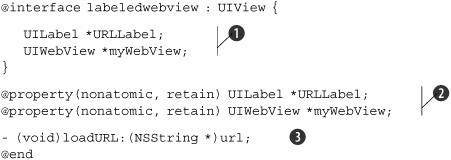
This is the last time that we’re going to look at a header file that has only basic information in it, but since it’s your first time working with a new class, we figure it’s still worthwhile. Within the header file, you again engage in some of those common declarations that you saw back in our Hello, World! program.
New programs will usually be full of new classes. Here are three major reasons why you might create new classes: