concept segmented control in category ios
appears as: segmented control, The segmented control, segmented control, segmented controls

This is an excerpt from Manning's book iOS Development with Swift.
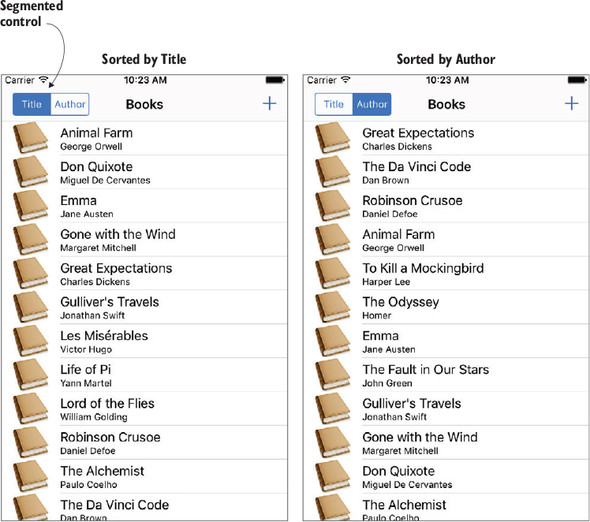
The segmented control allows the user to choose between two or more options. Let’s add a segmented control to enable the user to choose between title and author to sort the table (see figure 10.1).
In the storyboard, find the segmented control in the Objects Inspector, and drop the segmented control directly into the table view controller’s navigation bar on the left. This will automatically embed the segmented control inside a bar button item. For a strange reason, the default style that Interface Builder gives the bar button item may produce a warning. Change the bar button item’s style to Bordered and the warning should go away. The segmented control will by default contain two segments. Select the segmented control and open the Attributes Inspector. (Remember the Control-Shift-click trick to select the segmented control and not the bar button item.) The Segment attribute indicates which segment the other attributes relate to (see figure 10.2).
Select Segment 1, and give it the title “Author.” Because the segmented control is a control, you can register a target action method to be called when the user changes a value. With the storyboard open in the Assistant Editor, Control-drag from the segmented control to the BooksTableViewController, and create an action. Call it changedSegment. Be sure to change the type from the generic Any to UISegmentedControl. You should see this: @IBAction func changedSegment(_ sender: UISegmentedControl) { // change sort order here }