concept tab bar in category ios

This is an excerpt from Manning's book iOS Development with Swift.
Table 1.2. iOS application templates
In this chapter, you’ll extend your Bookcase app. You’ll add the ability to sort and search the books data, and you’ll display the books in a more customized grid layout. You’ll add a tab bar to navigate between the table view of books and your new grid view of books.
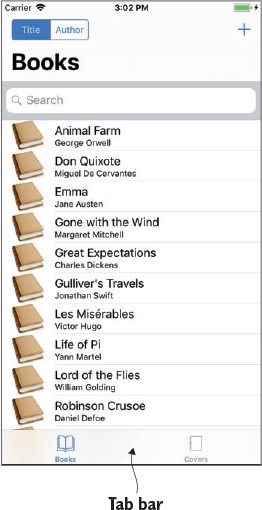
Sharing data between view controllers is a theme that often pops up in iOS development. We’ve already looked at strategies for passing data when navigating with segues, but tab bars are a different beast altogether. As you’ve seen, they have relationship segues with their scenes, which don’t trigger the prepareForSegue method.

This is an excerpt from Manning's book Anyone Can Create an App: Beginning iPhone and iPad programming.
You use a Tab Bar Controller every time you use the phone app on your iPhone, although you probably didn’t know what it was called until now. The tab bar is the bar at the bottom of many apps that has several buttons with icons on it. For example, in the Phone app, you have bottom icons for Favorites, Recents, Contacts, Keypad, and Voicemail. Tab Bar Controllers are powerful and allow for attractive and smooth navigation through your app.