concept uiview in category ios

This is an excerpt from Manning's book iOS 4 in Action: Developing iPhone and iPad Apps.
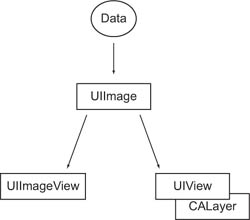
The first is through Quartz 2D, a two-dimensional drawing library that allows for complex line drawings, much as Canvas did on the web. It’s also the heart of the Core Graphics frameworks. We already touched on Quartz in chapter 11, when you drew images straight to the CALayer of a UIView; it will be the focus of the majority of this chapter. Quartz also supports Core Animation functions, which we’ll address somewhat more briefly.

This is an excerpt from Manning's book iPhone and iPad in Action: Introduction to SDK Development.
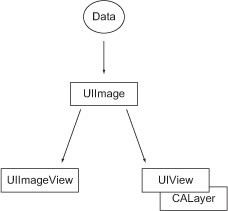
The first is through Quartz 2D, a two-dimensional drawing library that allows for complex line drawings, much as Canvas did on the web. It’s also the heart of the Core Graphics frameworks. We already touched on Quartz in the previous chapter, when you drew images straight to the CALayer of a UIView; it will be the focus of the majority of this chapter. Quartz also supports Core Animation functions, which we’ll address somewhat more briefly.

This is an excerpt from Manning's book iPhone in Action: Introduction to Web and SDK Development.
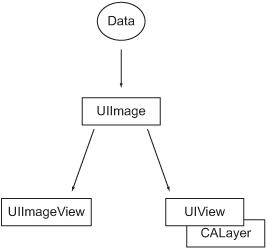
The first is through Quartz 2D, a two-dimensional drawing library that allows for complex line drawings, much as Canvas did on the web. It’s also the heart of the Core Graphics frameworks. We already touched upon Quartz in the previous chapter, when we drew images straight to the CALayer of a UIView; it’ll be the focus of the majority of this chapter. Quartz also supports Core Animation functions, which we’ll address somewhat more briefly.