concept reducer in category isomorphic web applications
appears as: Reducers, reducers, A reducer, The reducers, reducer, reducer

This is an excerpt from Manning's book Isomorphic Web Applications: Universal Development with React.
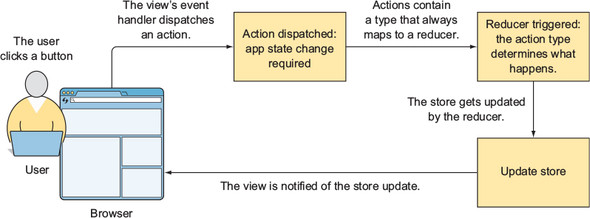
Like React, Redux follows a single-direction flow of data. Redux holds the state of your app in its store, providing a single source of truth for your application. To update this store, actions (JavaScript objects that represent a discrete change of app state) are dispatched from the views. These actions, in turn, trigger reducers. Reducers are pure functions (a function with no side effects) that take in a change and return a new store after responding to the change. Figure 1.11 shows this flow.

Create cart actions and reducers to fetch the cart data
Listing 7.10. Initialize the Redux store—src/shared/init-redux.es6
import { createStore, combineReducers, applyMiddleware, compose } from 'redux'; #1 import thunkMiddleware from 'redux-thunk'; #2 import loggerMiddleware from 'redux-logger'; #3 import cart from './cart-reducer.es6'; #4 export default function (initialStore = {}) { const reducer = combineReducers({ #5 cart }); const middleware = [ thunkMiddleware, loggerMiddleware ]; #6 return compose( applyMiddleware(...middleware) )(createStore)(reducer, initialStore); #7 } #1 Import all functions needed from Redux. #2 Import Thunk middleware so you can use asynchronous actions. #3 Import logger middleware to help with debugging—on the server, it’ll log in terminal. #4 Import cart reducer. #5 Create the root reducer, which will eventually have other subreducers for user, product, and blog data. #6 Set up the middleware. #7 Compose the middleware and reducers to create new store. !@%STYLE%@! {"css":"{\"css\": \"font-weight: bold;\"}","target":"[[{\"line\":4,\"ch\":56},{\"line\":4,\"ch\":58}],[{\"line\":22,\"ch\":0},{\"line\":22,\"ch\":2}],[{\"line\":5,\"ch\":56},{\"line\":5,\"ch\":58}],[{\"line\":23,\"ch\":0},{\"line\":23,\"ch\":2}],[{\"line\":6,\"ch\":56},{\"line\":6,\"ch\":58}],[{\"line\":24,\"ch\":0},{\"line\":24,\"ch\":2}],[{\"line\":7,\"ch\":56},{\"line\":7,\"ch\":58}],[{\"line\":25,\"ch\":0},{\"line\":25,\"ch\":2}],[{\"line\":10,\"ch\":56},{\"line\":10,\"ch\":58}],[{\"line\":26,\"ch\":0},{\"line\":26,\"ch\":2}],[{\"line\":16,\"ch\":56},{\"line\":16,\"ch\":58}],[{\"line\":27,\"ch\":0},{\"line\":27,\"ch\":2}],[{\"line\":19,\"ch\":56},{\"line\":19,\"ch\":58}],[{\"line\":28,\"ch\":0},{\"line\":28,\"ch\":2}]]"} !@%STYLE%@!