concept annotation in category itext

This is an excerpt from Manning's book iText in Action, Second Edition.
PdfWriter is the class responsible for writing the PDF file. You can also add contents, such as annotations, to PdfWriter. As opposed to the high-level objects added to the Document object, manipulations on PdfWriter are often referred to as low-level access and writing to the direct content. You’ll find out more about these concepts in chapter 3.
According to Merriam-Webster’s Online Dictionary, an annotation is a note added by way of comment or explanation. But an annotation in a PDF can be much more. It can be a movie or a sound that will be played in the document. It can be a field with a value that changes depending on other fields. It can be a shape that changes color if you move over it with the mouse.
But let’s not get ahead of ourselves; let’s start with the simplest type of annotation: a text annotation aka a sticky note.
Suppose some new type of annotation is invented; for instance, a "Foobar" annotation. You could create such an annotation like this:
annotation.put(PdfName.SUBTYPE, new PdfName("Foobar"));PdfAnnotation is a subclass of PdfDictionary. Just like PdfAction, it’s a collection of key-value pairs. The type of the annotation is defined by the /Subtype key. The other entries of the annotation dictionary depend on this value.
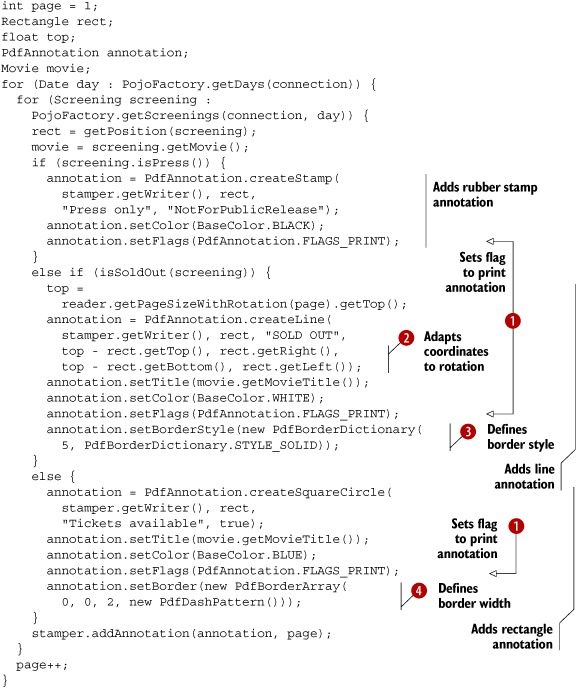
The screening of the movie Leaving Las Vegas on October 18 is sold out. Just as with text annotations, this information is shown when you move your mouse over the annotation. The annotation for the movie Amores Perros is open, because it’s been double-clicked. The press screenings have an X stamped over them; they are not open to the public.
If you print the PDFs created in the previous examples, you won’t see any of the annotations you’ve added showing up on paper. By using setFlags() with the FLAGS_PRINT flag in this example, you’ve made the stamp, line, and rectangle visible when printed. Note that this doesn’t include the sticky note. For instance, the opened annotation saying that there are tickets available for Amores Perros won’t be printed; only the dashed lines of the rectangle will be. The width of the media box of a timetable page is smaller than its height, but you define the annotation rectangle as if the page is in landscape orientation, because the rotation of the page is 90 degrees. iText transforms this rectangle internally to make sure it’s in the right place. To create a line annotation (or other annotations involving coordinates, such as /Polygon and /PolyLine annotations), however, you need to provide extra coordinates. In this case, you have to perform the transformation yourself if the media box is rotated. You can change the border of the annotation using the setBorderStyle() method. Using the BorderStyleDictionary object, you can create different border styles. You can also change the border using the setBorder() method. This method expects an object of type BorderArray.
We could go on with more types of annotations and more properties, but this isn’t the place or time to do so. This book doesn’t replace the PDF reference or ISO-32000-1, and if we want to create interactive forms in the next chapter, we need to do a little bit of JavaScript programming first.