concept page in category itext

This is an excerpt from Manning's book iText in Action, Second Edition.
Looking at the first line in this code snippet, you might expect a document with a page measuring 200 in. x 200 in., but when you look at the document properties of the resulting file, you’ll see that it measures 15,000,000 in. x 15,000,000 in. That’s because you’ve changed the user unit to 75,000 in the last line of listing 1.3. Now, one user unit corresponds with 75,000 points, and you’ve created a PDF document with the largest possible page size.
In this first example, we’ll inspect some of the PDF documents you created in part 1. You can query a PdfReader instance to get the number of pages in the document, the rectangle defining the media box, the rotation of the page, and so on.
Listing 6.1. PageInformation.java
public static void inspect(PrintWriter writer, String filename) throws IOException { PdfReader reader = new PdfReader(filename); writer.println(filename); writer.print("Number of pages: "); writer.println(reader.getNumberOfPages()); Rectangle mediabox = reader.getPageSize(1); writer.print("Size of page 1: ["); writer.print(mediabox.getLeft()); writer.print(','); writer.print(mediabox.getBottom()); writer.print(','); writer.print(mediabox.getRight()); writer.print(','); writer.print(mediabox.getTop()); writer.println("]"); writer.print("Rotation of page 1: "); writer.println(reader.getPageRotation(1)); writer.print("Page size with rotation of page 1: "); writer.println(reader.getPageSizeWithRotation(1)); writer.print("File length: "); writer.println(reader.getFileLength()); writer.print("Is rebuilt? "); writer.println(reader.isRebuilt()); writer.print("Is encrypted? "); writer.println(reader.isEncrypted()); writer.println(); writer.flush(); }
After merging two PDFs, I’m seeing unnecessary white space. Why are there so many blank areas? Sometimes people expect that a document with one page concatenated with another document counting one page will result in a document with only one page. They expect that, when the pages of the original document are only half full, the new document will put both halves on one page. That’s not how PDF works! In PDF, you work with complete pages; it’s not possible to reflow the content on those pages.
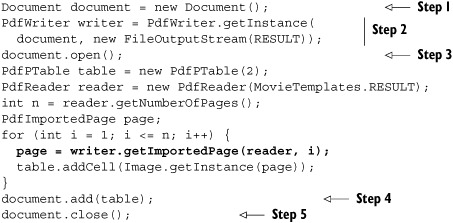
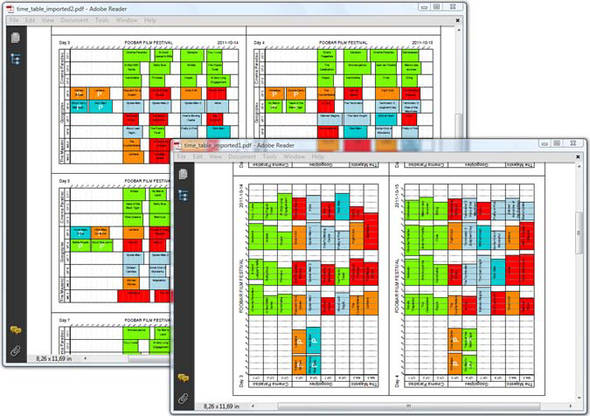
Let’s continue working with the timetable from chapter 3. Suppose you want to reuse the pages of this document and treat them as if every page were an image. Figure 6.1 shows how you could organize these imported pages into a PdfPTable. The document in the front of figure 6.1 is created with the code in listing 6.4.