concept Ajax request in category java

This is an excerpt from Manning's book Portlets in Action.
In this chapter, we’ll refer to the HTTP request sent by the web browser’s XMLHttpRequest object as the Ajax request.
The DateTimePortlet’s home.jsp page, which contains a JavaScript function to send an Ajax request, is shown next.
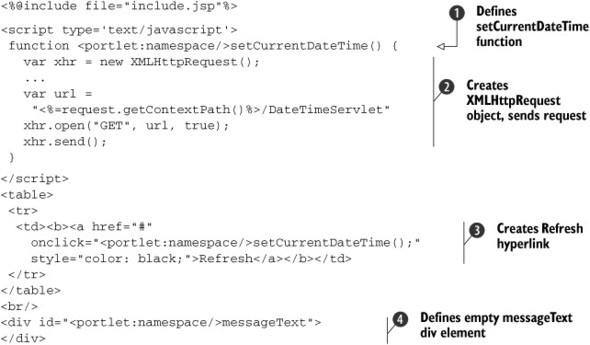
Alternatively, you can restrict the portlet so it’s displayed only to registered users. The Date/Time portlet shows an invented scenario in which we want to secure only the Ajax requests that will be processed by a servlet component. In real-world portlets, only a portion of the portlet content is shown using Ajax requests, so hiding the portlet in such a scenario isn’t an option.
It’s possible that the servlet component responsible for processing Ajax requests is outside the portlet application. In such cases, you’ll have to rely on a portal server–specific feature to share the PortletSession across different web applications. For instance, in Liferay Portal you can share APPLICATION_SCOPE session attributes with portlets in other portlet applications by setting the session.shared.attributes property in the portal-ext.properties file (discussed in appendix B) and the <private-session-attributes> element in the liferay-portlet.xml file. Note that such features are portal server–specific and will result in portability issues.
In listing 12.12, the ContentPane widget represents a basic widget that contains the actual content of a tab in the tabbed pane. Let’s now look at how you can retrieve HTML content for ContentPane by sending an Ajax request to the portlet’s resource URL.