concept dependency in category java

This is an excerpt from Manning's book JUnit in Action.
The only needed dependency is junit-vintage-engine, which belongs to JUnit 5. JUnit 5 Vintage (a component of the JUnit 5 architecture, discussed in section 3.3.4) ensures backward compatibility with previous versions of JUnit. Working with JUnit 5 Vintage, Maven transitively accesses the dependency to JUnit 4 as well. As it may be tedious and time-consuming to move the existing tests to JUnit 5, introducing this dependency may ensure the coexistence of JUnit 4 and JUnit 5 tests within the same project.
Listing 11.2 A simple Gradle build.gradle file
plugins {
    // Apply the java plugin to add support for Java
    id 'java'

    // Apply the application plugin to support building a CLI application
    id 'application'
}

repositories {
    // Use jcenter for resolving dependencies.
    // You can declare any Maven/Ivy/file repository here.
    jcenter()
}

dependencies {
    // Use JUnit Jupiter API for testing.
    testImplementation 'org.junit.jupiter:junit-jupiter-api:5.6.0'

    // Use JUnit Jupiter Engine for testing.
    testRuntimeOnly 'org.junit.jupiter:junit-jupiter-engine:5.6.0'
}

application {
    // Define the main class for the application
    mainClassName = 'com.manning.junitbook.ch11.App'
}

test {
    // Use junit platform for unit tests
    useJUnitPlatform()
}
Unit testing is simplified; the classes are simpler and not cluttered with dependencies. It is very easy to make changes to object dependencies in the system. We simply need to change the application-context.xml file; we do not need to recompile the Java source files. It is recommended that you insert in the DI (IoC) container any objects for which the implementation may change. Thus we have taken a step between the traditional approach, where the dependencies are in the code, to the DI (IoC) approach, where objects do not know anything about each other (figure 16.5).
This is an excerpt from Manning's book The Java Module System.
Has an application of yours ever crashed with a
NoClassDefFoundError? This occurs when the JVM can’t find a class on which the code that’s currently being executed depends. Finding the depending code is easy (a look at the stack trace will reveal it), and identifying the missing dependency usually doesn’t require much more work (the missing class’s name often gives it away), but determining why the dependency isn’t present can be tough. Considering the artifact dependency graph, though, the question arises why we’re only finding out at run time that something’s missing.
Listing 10.1 Depends on a concrete type and establishes the dependency
public class InputStreamAwesomizer {

       private final ByteArrayInputStream stream;    #1

       public AwesomeInputStream(byte[] buffer) {
               stream = new ByteArrayInputStream(buffer);    #2
       }

       // [... awesome methods ...]

}
Under what circumstances will the dependency be present?
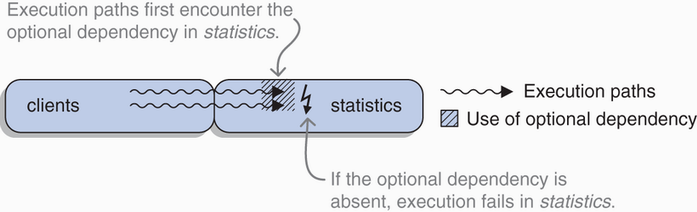
The general case is different, though, as shown in figure 11.11. It may well be the module with the optional dependency that first tries to load classes from a dependency that might not be present so the risk of a
NoClassDefFoundErroris very real.Figure 11.11 In the general case, it isn’t guaranteed that the client code calling a module like statistics has already established the optional dependency. In that case, execution paths (squiggly lines) may first encounter the dependency in the statistics module (striped area) and will fail if the optional dependency is absent.

This is an excerpt from Manning's book Testing Java Microservices: Using Arquillian, Hoverfly, AssertJ, JUnit, Selenium, and Mockito.
Solitary unit testing should focus on the interaction around a single object class. The test should encompass only the class’s own dependents or dependencies on the class. You’ll usually test resource, persistence, and remote components using solitary tests, because those components rarely need to collaborate with each other; see figure 1.12.
If you’re using Maven for your build, adding the dependencies for Arquillian is trivial. Declare the BOM using the import scope in the <dependencyManagement> section of your project pom.xml. You can see in the following listing that a WildFly (http://wildfly.org) BOM is provided. BOMs are useful!
Listing 7.4. Adding dependencies
<dependency>
    <groupId>de.flapdoodle.embed</groupId>
    <artifactId>de.flapdoodle.embed.mongo</artifactId>
    <version>2.0.0</version>
    <scope>test</scope>
</dependency>
<dependency>
    <groupId>com.github.kstyrc</groupId>
    <artifactId>embedded-redis</artifactId>
    <version>0.6</version>
</dependency>
This is an excerpt from Manning's book The Well-Grounded Java Developer.
That’s where a DI framework with an IoC container can really help out. As a basic analogy, the DI framework is a runtime wrapper around your code, injecting the dependencies that you need, when you need them.
DI frameworks have the advantage that they can do this at just about any point in the code where you need a dependency. The framework is able to do this because it has an IoC container that holds the dependencies ready for your code to use at runtime.
But all TDD practitioners eventually run across the problem of testing code that utilizes a dependency or subsystem. The next section will cover techniques you can use to effectively test those.

This is an excerpt from Manning's book Flex on Java.
Let’s move on to installing Maven to create the project structure, manage the dependencies, and build the application.
After you’ve moved the files to the new project, add a dependency on the new library project you created in the flex-bugs-ria project. Open the pom.xml file in the flex-bugs-ria project and add the following to the dependencies section.
<dependency>
  <groupId>org.foj</groupId>
  <artifactId>flex-bugs-lib</artifactId>
  <version>1.0-SNAPSHOT</version>
  <type>swc</type>
</dependency>
Treat the common library just as you do any other Maven dependency, whether it is for a Java project or a Flex project. The only difference being the type element in the dependency, which in this instance is swc, because the dependency is an SWC library. Now that you’ve got the common library created, you can now create the AIR application.

This is an excerpt from Manning's book JUnit in Action, Second Edition.
Remember that unit tests verify your code in isolation. Your unit tests should instantiate the class you want to test, use it, and assert its correctness. Your test cases should be simple. What happens when your class instantiates, directly or indirectly, a new set of objects? Your class now depends on these classes. In order to write testable code, you should reduce dependencies as much as possible. If your classes depend on many other classes that need to be instantiated and set up with some state, then your tests will be complicated—you may need to use some complicated mock-objects solution (see chapter 6 for mock objects).
A solution to reducing dependencies is to separate your code between methods that instantiate new objects (factories) and methods that provide your application logic. Consider listing 5.1.

This is an excerpt from Manning's book AspectJ in Action, Second Edition.
Ideally, you should write a test for your aspect so you can run it automatically. Developing such tests, however, require injecting a mock or stub object in the CacheAspect instance to set its cache property. Then we can control and observe interaction with the cache property to verify correctness. We haven’t yet examined the mechanism to access an aspect instance that you need to in order to inject dependencies. You’ll learn that mechanism in chapter 6, where you’ll improve this aspect and write tests for it.
Locator— Introduce a locator class (commonly known as a service locator) with a method to obtain a reference to a shared object. At the application or container level, you register various objects with the locator. Doing so removes the hard-coded dependency between the Order class and a pricing strategy implementation.
private transient PricingStrategy pricingStrategy
= (PricingStrategy) Context.get("pricingStrategy"); Such an arrangement makes it easier to swap the implementation by registering a different object with the locator. But the domain objects now depend on the locator class—Context, in turn, adds a dependency on the environment that supplies a locator. Compared with the hard-coded dependencies approach, such an arrangement doesn’t fare much better with unit testing. Unit tests need to somehow coerce the Context object into returning the expected mock or stub object, because you may need to set the pricingStrategy to a different mock or stub object in each test.Dependency injection— Add the necessary structure to domain objects to enable DI. For example, you can add a setter for each injected dependency. Then, you let a container inject dependencies upon instantiating the object. With this setup, the object has no knowledge of the mechanics of the DI. You can swap one service for another by modifying the configuration. For unit testing, you can set the dependencies directly by calling setters from the test code, without needing any special mechanism.
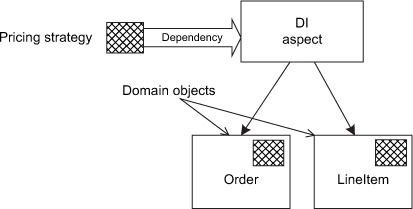
Spring uses the AspectJ weaver to provide a prebuilt solution to inject dependency into any objects—even those that are instantiated outside of Spring. An aspect injects dependencies whenever an instance of a specified class is instantiated or deserialized. Figure 16.1 shows how an aspect injects dependencies into domain objects.
You can avoid the performance problem and the object’s dependency on Spring using domain interface-based DI. This requires writing aspects, but if you’ve come this far in reading this book, it should be of no big concern to you!
A way to look at the Order and LineItem classes is that they’re clients of the injected dependencies. The classes may indicate this relationship by implementing specific interfaces. A typical interface would include setter methods that set dependencies. This style allows using domain-specific interfaces instead of the Spring-specific @Configurable annotation. Listing 16.7 shows the interface that a client of PricingStrategy would implement.
Listing 16.7. Interface to be implemented by PricingStrategy clients
package ajia.domain; import ... public interface PricingStrategyClient { void setPricingStrategy(PricingStrategy pricingStrategy); }Spring includes GenericInterfaceDrivenDependencyInjectionAspect that implements the core logic to inject dependencies. You can extend this aspect to apply DI on classes that implement your domain specific interface(s). For example, listing 16.8 shows the Order class that implements the PricingStrategyClient interface.
Listing 16.8. Order class implementing domain-specific interface
package ajia.domain; import ... public class Order extends DomainEntity implements PricingStrategyClient { ... private transient PricingStrategy pricingStrategy; ... public void setPricingStrategy(PricingStrategy pricingStrategy) { this.pricingStrategy = pricingStrategy; } }Notice that you no longer need a Spring-specific annotation in this class. Listing 16.9 shows an aspect that injects dependencies into the object of the classes that implement PricingStrategyClient.
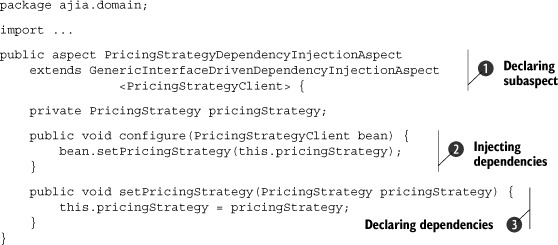
This code implements what we may call the dependency distribution pattern. You inject the aspect with dependencies and the aspect will distribute those dependencies into other objects. Let’s see the parts of the aspect in more details.
The PricingStrategyDependencyInjectionAspect subaspect extends GenericInterfaceDrivenDependencyInjectionAspect and binds its generic parameter to PricingStrategyClient. This indicates that objects of the PricingStrategyClient type and its subclasses will be configured by the subaspect. Notice how simple it is to write the subaspect. The configure() method provides a definition for the abstract method in the base aspect. The base aspect will call this method whenever a configurable object matching the generic parameter type is either created or deserialized. The method calls the appropriate setter to inject the dependency. In your case, there is only one dependency to set. But you may configure the object in whatever way appropriate. Note that, dependency injection is done by direct method calls instead of reflection, thus offering better performance. The aspect includes a setter to declare a dependency that it will distribute to the advised objects. Alternatively, you can mark the pricingStrategy field with @Autowired and avoid the setter. Of course, you’ll need to configure each aspect to inject the dependency into it. Listing 16.10 shows the bean definition corresponding to the aspect.
Listing 16.10. Dependency injection into the aspect
<beans ...> <bean id="pricingStrategy" class="ajia.domain.SimplePricingStrategy"/> <bean class="ajia.domain.PricingStrategyDependencyInjectionAspect" factory-method="aspectOf"> <property name="pricingStrategy" ref="pricingStrategy"/> </bean> </beans>You don’t need a prototype bean defined in the application context, because each DI aspect knows how to inject dependencies.



This is an excerpt from Manning's book Struts 2 in Action.
First, we learn how to use a Spring container to provide a more sophisticated means of managing our application resources. While Spring provides many different services to the application developer, we focus here on the use of Spring as a means of dependency injection. In short, we use Spring to intervene in the creation of both framework and application objects for the purpose of injecting dependencies into those objects. We both explain what this means and demonstrate the details by upgrading our Struts 2 Portfolio to use Spring for such purposes as injecting our service object into the actions that require it.
As we said, Spring is many things, but one of its most popular uses is the management of object creation and the injection of dependencies into those objects as they’re created. Rather than using code to acquire our resources, we use metadata to declare what dependencies a given object requires. Spring reads this metadata, commonly located in an applicationContext.xml file, to learn about the dependencies of the objects it manages. Spring offers several means of injecting dependencies into managed objects, but one common method is via setter methods exposed by the managed object.