concept Grails in category java

This is an excerpt from Manning's book The Well-Grounded Java Developer.
Or suppose you need to build a web console so that the operations users can administer some of the noncritical static data behind the payment-processing system. The development team members already know Struts and JSF, but don’t feel any enthusiasm for either technology. This is another low-risk area to try out a new language and technology stack. One obvious choice would be Grails (the Groovy-based web framework originally inspired by ideas from Ruby on Rails). Developer buzz, backed up by some studies (including a very interesting one by Matt Raible), says that Grails is the best-available web framework for productivity.
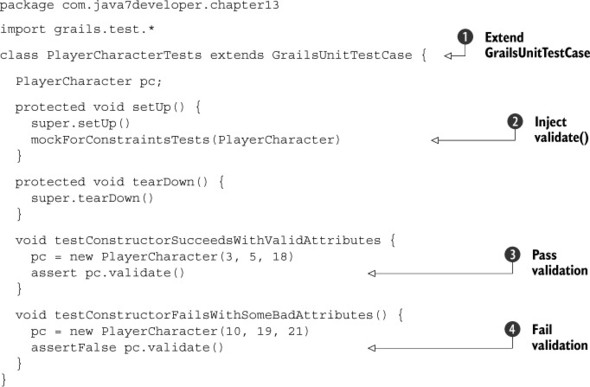
We’re going to make use of another rapid web development feature that Grails has: support for automatically validating domain objects. The validate() method can be automatically called on any domain object in Grails in order to ensure that it’s a valid object. The following code listing will test that the three statistics of strength, dexterity, and charisma are all numeric values from 3 to 18.
Grails unit tests should always extend from GrailsUnitTestCase
. As is standard with any JUnit-based test, you have setUp() and tearDown() methods. But in order to use the Grails built-in validate() method during the unit test phase, you have to pull it in via the mockForConstraintsTest method
. This is because Grails treats validate() as an integration test concern and typically only makes it available then. You want faster feedback, so you can bring it into the unit test phase. Next, you can call validate() to check whether or not the domain object is valid
,
.
Grails is a Groovy-based rapid web application framework that utilizes several third-party libraries to implement its functionality, including Spring, Hibernate, JUnit, a Tomcat server, and more. It’s a full-stack web framework, providing solutions for all 20 criteria that we listed in section 13.2. Another important point is that Grails borrows heavily from the Rails concept of convention over configuration. If you write your code according to the conventions, the framework will perform a lot of boilerplate work for you.
In this section, we’ll cover building your first quick-start application. While building the quick-start application, you’ll see plenty of evidence as to why Grails puts the “rapid” into rapid web development. We’ll also give you pointers to important Grails technologies that you’ll want to explore further, in order to build serious production-ready applications.

This is an excerpt from Manning's book Griffon in Action.
A year later, another web framework appeared: its name was Grails, and Groovy was its game. It followed RoR’s ideals, but its founders decided to base the framework on well-known Java technologies such as the Spring framework, Hibernate, SiteMesh, and Quartz. Grails included a default database and a full stack to develop JEE applications without the hassle that comes with a regular JEE application.
Grails grew in popularity and a community was created around it, to the point that it’s now the most successful and biggest project at the Codehaus (www.codehaus.org), an organization that hosts open source projects; that’s where Grails was born and Griffon is hosted.
Grails is a convention-over-configuration, MVC-based, Groovy-powered web application development framework. Does that definition sound familiar? Just exchange desktop for web, and you get Griffon.
Both frameworks share a lot of traits, and it’s no surprise that Griffon’s MVC design and plugin facility were based on those provided by Grails, or that the command-line tools and scripts found in one framework can also be found in the other. The decision to use Grails as the foundation of Griffon empowers developers to switch between web and desktop development: the knowledge gathered in one environment can easily be translated to the other.
void testWordIsFound() {
    window.with {
        textBox('word').enterText('griffon')
        button('search').click()
        textBox('result')
            .requireText('griffon: Grails inspired desktop\
                          application development platform.')
    }
}
It’s hard to find a web developer these days who hasn’t come across an Ajax- or RIA-powered website. These technologies have become so ubiquitous that we can’t go back to the times when Web 2.0 didn’t exist. There are myriad options for building a web application that has Ajax built in or that presents a rich interface, in both the frontend and backend tiers. Grails happens to be one of the front runners when dealing with the JVM.
We’ve mentioned Grails a few times already in this book. If you’re a developer working on web applications and you haven’t given Grails a try, you owe it to yourself to do so. We can guarantee you won’t be disappointed.
Grails is a full-stack web development platform whose foundations lie in Spring and Hibernate, so it shouldn’t be hard for a Java developer to pick it up and get to work. But what really makes it revolutionary is its choice of default development language: Groovy, the same as in Griffon.
Grails has another ace up its sleeve: a ready-for-business command tool that’s also extensible via plugins. It’s thanks to this plugin system that building a Grails application is a breeze. Need a way to search through your data? Install the Searchable plugin. Your requirements ask for CouchDB instead of a traditional SQL store? No problem, install the CouchDB plugin. What’s that? You need to protect certain parts of an application using security realms? The Shiro plugin is here to help. You get the idea.
Setting up Grails is as easy as setting up Griffon:

This is an excerpt from Manning's book Flex on Java.
These advantages benefit other technologies besides pure Java, as you’ll see in chapter 11, when we demonstrate Flex integration with Grails, one of the hottest web development platforms. We’ll build a simple contact management system and learn how to get rolling with Groovy and Grails development. Integrating Flex with Grails is in many respects easier than integrating Flex with Java.
Not all real-world development is against an existing application. Every once in a while you have fun developing new code. What do you do when you want to rapidly prototype a data-driven application with Flex? With the Flex part it’s easy enough to develop a UI, but what about the backend? You could always develop a Java-based backend using the same methods and techniques we described throughout this book, or you could take advantage of another framework, such as Grails, to quickly get your data-driven backend off the ground.
Installing Grails is a rather simple task. Point your browser to the Grails project downloads page (http://grails.org/Download) and download the appropriate distribution for your platform. This chapter was written using Grails 1.1.2, which was the latest stable distribution available at the time of writing. There is no reason to install Groovy separately because it’s included with the Grails distribution. Grails is available in two main forms, a binary distribution and a source distribution. Download the binary distribution in either Zip or Tar/GZ format, depending on your operating system.
After you’ve downloaded the binary distribution for Grails, unzip the Grails distribution to a folder such as c:\dev\grails-1.1.2. Then create a GRAILS_HOME environment variable and point it to the same folder. As a last step, append GRAILS_HOME\bin to your PATH variable so that you can run the Grails executable from the command line. When you’ve finished, open up a command line and type grails –version and you should see output similar to this snippet.
C:\dev> grails -version

Welcome to Grails 1.1.2 - http://grails.org/
Licensed under Apache Standard License 2.0
Grails home is set to: C:\dev\grails-1.1.2

Base Directory: C:\dev
...
Congratulations! You’ve got Grails installed and configured. Now let’s move on to creating the Grails application.
C:\dev> grails -version

Welcome to Grails 1.1.2 - http://grails.org/
Licensed under Apache Standard License 2.0
Grails home is set to: C:\dev\grails-1.1.2

Base Directory: C:\dev
...