concept group in category java

This is an excerpt from Manning's book Testing Java Microservices: Using Arquillian, Hoverfly, AssertJ, JUnit, Selenium, and Mockito.
Listing 7.9. Defining a group
<group qualifier="tomee-cluster" default="true">                #1
    <container qualifier="gamerweb" default="true">                 #2
        <configuration>
            <property name="httpPort">8080</property>               #3
            <property name="stopPort">-1</property>
            <property name="ajpPort">-1</property>
            <property name="classifier">plus</property>
            <property name="appWorkingDir">target/gamerweb_work
     </property>
            <property name="dir">target/gamerwebservice
     </property>                                                  #4
        </configuration>
    </container>
    <container qualifier="commentsservice" default="false">
        <configuration>
            <property name="httpPort">8282</property>
            <property name="stopPort">-1</property>
            <property name="ajpPort">-1</property>
            <property name="classifier">plus</property>
            <property name="appWorkingDir">target/
     commentsservice_work</property>
            <property name="dir">target/commentsservice
     </property>
        </configuration>
    </container>
    <container qualifier="gameaggregatorservice" default="false">
        <configuration>
            <property name="httpPort">8383</property>
            <property name="stopPort">-1</property>
            <property name="ajpPort">-1</property>
            <property name="classifier">plus</property>
            <property name="appWorkingDir">target/
     gameaggregatorservice_work</property>
            <property name="dir">target/gameaggregatorservice
     </property>
            <property name="properties">
                com.sun.jersey.server.impl.cdi.
     lookupExtensionInBeanManager=true
            </property>
        </configuration>
    </container>
</group>

This is an excerpt from Manning's book Spring Integration in Action.
An Aggregator (figure 1.12) waits for a group of correlated messages and merges them together when the group is complete. The correlation of the messages typically is based on a correlation ID, and the completion is typically related to the size of the group. A splitter and an aggregator are often used in a symmetric setup, where some work is done in parallel after a splitter, and the aggregated result is sent back to the upstream gateway.
As we discussed in chapter 1, correlating messages is sometimes essential to implementing a certain business requirement. This chapter explains the different options for message correlation, whether your goal is to reassemble a previously split-up array of related data (splitter-aggregator), make sure ordering constraints are enforced on messages (resequencer), or split up work between specialized services (Scatter-Gather pattern). In all these cases, the correlation of the messages is key, so it makes sense to discuss how Spring Integration stores and identifies the correlation of messages and how you can extend this functionality. It’s explained in detail in the “Under the hood” section later in the chapter; for now, it’s enough to understand the functional concept of correlating messages in a group.
The aggregator, as discussed earlier, takes a group as a whole and forges a new message out of it. We look at the release and processor strategies in detail in the next few paragraphs.
The release strategy of an aggregator should be to release the group only when the processing is complete (or if it times out). The SequenceSizeReleaseStrategy implementation handles this behavior. For this common case, the MessageGroup has an isComplete() method, the default implementation of which compares the sequence size header to the size of the group. This is convenient if you’re implementing a custom release strategy but still are interested in the default completeness of the group.
The message group processor of an aggregator should turn all the messages of a group into a single aggregated message and send it off to the output channel. The most common implementation used is the MethodInvokingMessageGroupProcessor, which wraps around a method. The method should have the following signature (pointcut expression language):


This is an excerpt from Manning's book Griffon in Action.
You named the group filePanel because you’ll use a panel container, but you could have chosen FileTab or some other name that indicates this group is related to files and tabs. Again you end up with three files that follow the MVC pattern, each organized in a specific folder.
Where do you register a group? In the Application.groovy file that lives in griffonapp/conf. We won’t look at the whole file here; the following code shows just the parts relating to MVC groups.
Listing 6.1. MVC group declarations in Application.groovy
. . . mvcGroups { // MVC Group for "FilePanel" 'filePanel' { model = 'FilePanelModel' view = 'FilePanelView' controller = 'FilePanelController' } // MVC Group for "GroovyEdit" 'groovyEdit' { model = 'GroovyEditModel' view = 'GroovyEditView' controller = 'GroovyEditController' } } . . .The declaration of the MVC group is fairly straightforward: in the mvcGroups section of the configuration, you declare the name of the MVC group and open a block describing all the portions that compose the group. The group portions are assigned to the names of the classes representing that portion of the MVC group. Note that the class names are defined as strings, for the sole reason of avoiding eager class resolution when the group configuration is loaded and parsed. The MVC group type itself is also in single quotes; this enables you to create groups that may not be groovy identifiers, possibly including spaces, dots, and any other characters you feel like adding. A key aspect of group names is that they must be unique within the application. If a duplicate name is encountered, the last group registered will win over the previous ones.
A group created with this method will be automatically destroyed as soon as it’s no longer of use. The typical case is a modal dialog that requires a few customizations before displaying itself, perhaps capturing some input and returning back to the original caller. Here’s an example of what we just described. Suppose a group named query is responsible for capturing a user selection in a model property named choice. The group’s controller also has an action named show that takes care of displaying the dialog:
def output = null
withMVCGroup('query') { m, v, c ->
    c.show()
    output = m.choice
}
Using this construct liberates you from explicitly destroying the group instance after it has been put to use. Destroying a group will be covered later in this chapter.
When creating the group, the first task the framework accomplishes is loading the Java class for the MVC group members. This is the plain Java part. What happens next is Groovy.
If the artifact or its superclass implements the griffon.core.GriffonArtifact interface and the superclass is Object, then the Griffon compiler switches the superclass to one that contains the app object and four method definitions (createMVC-Group(), buildMVCGroup(), withMVCGroup(), and destroyMVCGroup()). If the artifact or its superclass does not implement the griffon.core.GriffonArtifact interface, the app and the four method definitions are injected directly into the artifact’s byte code. The app field is a reference to the GriffonApplication object that serves as the central touchstone for the whole application, where all of the magic pixie dust is stored. The four injected methods are required for managing MVC groups. The first three methods exist for creating groups and the last one for destroying groups (more on that in the next section). These injections for an MVC member are compulsory; every member gets them. And they will overwrite any existing field or methods by the same name, so don’t even try!

This is an excerpt from Manning's book Portlets in Action.
Web portals provide benefits beyond those of a group of distinct web applications that serve content. In this section, we’ll look at how end users access content from different information sources using distinct web applications, and how web portals and web applications can coexist to take the user experience to new heights.
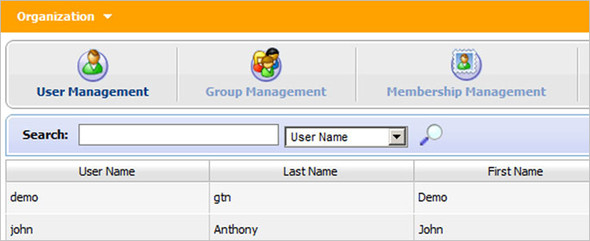
GateIn Portal allows you to create custom user groups and custom memberships (or roles). Also, the groups created in GateIn Portal can be hierarchical; you can have a top-level group that contains subgroups, which can further contain subgroups, and so on. In this section, we’ll look at how to create a custom BookPortalAdmin group in GateIn Portal.
To manage groups and memberships, select the Groups > Organization > Users and Groups management option. Figure A.14 shows the various options that are available for managing groups and memberships.
Figure A.14 shows that an administrator can manage users, groups, and memberships that are defined in GateIn Portal:

This is an excerpt from Manning's book JavaFX in Action.
For rows the group is the y coordinate in the grid and the position is the x coordinate. So position 0 of group 0 will be (0,0) on the grid, and position 2 of group 1 will be (2,1) on the grid. For columns the group is the x coordinate in the grid and the position is the y coordinate. So position 2 of group 1 will be (1,2) when translated into grid coordinates. For boxes we need to do some clever math to translate the group to a subsection of the grid, so group 8 (in the southeast corner) will have its first cell at coordinates (6,6). We then need to do some more clever math to turn the position into an offset within this subgrid. Position 1, for example, would be offset (1,0), giving us an absolute position of (7,6) on the grid when combined with group 8. The code that actually checks for duplicates within a given group is identical, as we’ve just seen—all that differs is the way the group type translates its group number and position into grid coordinates. So the function passed in to checkGroup() abstracts away this translation. The two values it accepts are the group and the position. The value it returns is the grid coordinate, or rather the index in the grid sequence that corresponds with the group and position. (One of the benefits of storing the grid as a single-dimension sequence is that we don’t need to figure out a way to return two values, an x and a y, from these three translation functions.)