concept Image in category java

This is an excerpt from Manning's book Swt/Jface in Action: GUI Design with Eclipse 3.0.
JFace is also helpful when you’re building large GUIs that require multiple windows and graphics. It provides registry classes that help you organize SWT components and manage their memory allocation. For example, in SWT, you need to specifically create and deallocate every Font and Image in your application. But with JFace, you can use built-in FontRegistry and ImageRegistry objects to take care of these tedious concerns for you.
The first argument requires an object that implements the Drawable interface. This interface contains methods that relate to the internals of a graphic context. SWT provides three classes that implement Drawable: Image, Device, and Control. Unless you create your own Drawable objects, you can only add graphics to instances of these classes or their subclasses. A diagram describing these relationships is presented in figure 7.1. Since Image objects will be covered in a later section, we’ll discuss Devices and Controls here.
However, the following snippet is presented only to demonstrate how an Image object works in a graphic context:

This code begins by constructing an ImageData object using an InputStream. In this case, it makes sense to start with an ImageData instance since Image objects can’t be resized or recolored. This resizing process is performed using the scaleTo() method, which shrinks the image for the GUI. This new image is shown in figure 7.6.
Figure 7.6. Although an Image object can be displayed in a window, the ImageData instance provides the information.
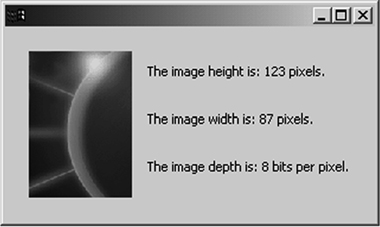
When a PaintEvent occurs, the program invokes the paintControl() method. This method creates the window’s graphic context and an Image object based on the ImageData. To the right of the image, three statements provide information regarding the fields of the ImageData instance. It’s worth noting that by changing the coordinates, you can superimpose the text (or any graphic) on the image.
Just as JFace’s FontRegistry class simplifies font management, the ImageRegistry class lets you incorporate multiple images in an application without worrying about resource deallocation. It also uses the same access methods as the FontRegistry class. To place an image in the registry, you use the put() method with an Image object and a String. When the image needs to be displayed, the get() method returns the image based on the key. Here’s an example that uses the eclipse_lg.gif file:
ImageRegistry ir = new ImageRegistry();
ir.put("Eclipse", new Image(display, "eclipse_lg.gif"));
Image eclipse = ir.get("Eclipse");
In this case, you still need to allocate resources for the Image object. This may cause a problem if the application places many images in the registry but only needs to display a few. For this reason, JFace created the ImageDescriptor class. Like SWT’s ImageData class, the ImageDescriptor contains the information needed for an image without requiring allocation of system resources. The get() and put() methods associated with the ImageRegistry class are also available for ImageDescriptor objects, as shown in the following code sample:
ImageRegistry ir = new ImageRegistry();
ImageDescriptor id = createFromFile(getClass(),"eclipse_lg.gif");
ir.put("Eclipse", id);
Image eclipse = ir.get("Eclipse");
If you use ImageDescriptors, the put() and get() operations can be performed without allocating for Image objects. This way, you can add a large number of ImageDescriptors to an application’s ImageRegistry without worrying about image creation. Finally, since an ImageRegistry disposes of its contents when its Display object is closed, you don’t need to concern yourself with image deallocation.
Most applications only create Image objects to add existing image files to a user interface. In this case, you should use the first and simplest of the Image constructor methods: