concept JavaScript in category java

This is an excerpt from Manning's book Java SE 11 Programmer I Certification Guide.
Related to JavaScript
Java isn’t related to JavaScript (except for the similarity in their name). JavaScript is a programming language used in web pages to make them interactive. Newer versions of JavaScript and its framework also let developers create server-side code.
This is an excerpt from Manning's book OCA Java SE 8 Programmer I Certification Guide.
The exam might also include some terms that are irrelevant.

This is an excerpt from Manning's book Play for Java.
Web frameworks for web developers are different. They embrace HTTP and provide APIs that use HTTP’s features instead of trying to hide HTTP, in the same way that web developers build expertise in the standard web technologies—HTTP, HTML, CSS, and JavaScript—instead of avoiding them.
A web page doesn’t consist solely of HTML. Styling is provided by CSS, and additional interaction can be defined in JavaScript. Play makes writing CSS and JavaScript easier, by supporting tools that improve on the existing technology.
Using LESS or CoffeeScript is trivial. You simply place the files in the app/assets directory or a subdirectory of the same. Give CoffeeScript files a .coffee extension and LESS files a .less extension, and Play will automatically compile them to JavaScript and CSS files and make them available in the public folder.

This is an excerpt from Manning's book Spring Roo in Action.
IntelliJ IDEA also has built-in support for Spring Beans, Hibernate, JSPs, JavaScript, and Maven. This makes it another excellent choice for developing Roo-based applications. You can choose to run the Roo shell in the IDE, or you can keep the shell running in the background in an operating system window. Which method you choose is up to you. You will want to turn on the Maven auto-import feature so that you get configuration changes as soon as Roo reconfigures your project.
Now let’s look at the second level of JavaScript enhancements: installing the jQuery UI.

This is an excerpt from Manning's book Portlets in Action.
Widgets (commonly also called gadgets) are similar to Java portlets in the sense that they’re used to aggregate content from distinct data sources on a web page, and they provide some level of personalization of content and behavior. You can quickly develop a widget if you know JavaScript and XML; there’s a steeper learning curve involved with the Java portlet technology.
Most of the second half of this chapter focuses on the Spring Validation API, JSR 303’s bean validation features, Spring’s form tag library, and how you can test Spring Portlet MVC controllers. Because testing controllers is an important aspect of developing portlets, we’ll look at how Spring simplifies testing using mock objects and the TestContext framework. Toward the end of this chapter, we’ll look at how you can localize content using Spring Portlet MVC, upload files from a portlet, and add JavaScript and CSS to the portal page that contains the portlet.
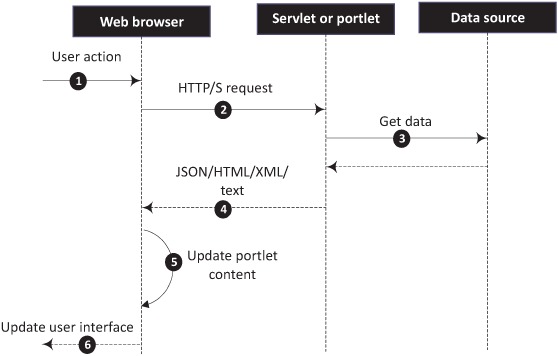
Figure 12.1. Ajax request handling. JavaScript in the portal page sends an asynchronous request to a servlet or portlet component, which processes the request and returns an HTML, XML, text, or JSON response to the browser. JavaScript in the portal page makes use of the response data to update a part of the portlet’s content.

This is an excerpt from Manning's book JUnit in Action, Second Edition.
HtmlUnit is a 100 percent Java headless browser framework that runs in the same virtual machine as your tests. Use HtmlUnit when your application is independent of operating system features and browser-specific implementations not accounted for by HtmlUnit, like JavaScript, DOM, CSS, and so on.
Selenium drives various web browsers programmatically and checks the results from JUnit. Selenium also provides a simple IDE to record and play back tests and can generate test code. Use Selenium when you require validation of specific browsers and operating systems, especially if the application takes advantage of or depends on a browser’s specific implementation of JavaScript, DOM, CSS, and the like. Let’s start with HtmlUnit.
HtmlUnit processes JavaScript automatically. Even when, for example, HTML is generated with Document.write(), you follow the usual pattern: call getPage, find an element, call click on it, and check the result.

This is an excerpt from Manning's book GWT in Practice.
Asynchronous JavaScript and XML (Ajax) development is hard. Not ascending-Everest hard, maybe not even calculating-your-taxes hard, but hard. This is true for a number of reasons: JavaScript can require a lot of specialized knowledge and discipline, browsers have slightly different implementations and feature sets, tooling is still immature, and debugging in multiple environments is problematic. All of these factors add up to developers needing a vast knowledge of browser oddities and tricks to build and manage large Ajax projects.
To help deal with these problems, a number of toolkits and libraries have emerged. Libraries like Dojo, Script.aculo.us, Ext JS, and the Yahoo User Interface Library (YUI) have sought to provide enhanced core features and general ease of use to JavaScript. In addition, projects like Direct Web Remoting (DWR) have sought to simplify communications between the client and the server. Even more advanced techniques, like those used by XML11 and Echo2, create an entire rendering layer in the browser while executing application code on the server side. These are all valid approaches, but the Google Web Toolkit (GWT) represents something different.
GWT is a Java to JavaScript cross-compiler. That is, it takes Java code and compiles it into JavaScript to be run in a browser, as figure 1.1 depicts.
Figure 1.1. An overview of the GWT approach. Java source code is compiled into JavaScript, which is then run in a web browser as JavaScript/HTML/CSS.

There are many reasons GWT was engineered to start with the statically compiled, strongly typed Java language, which has generous tooling and testing support, and then emits JavaScript application versions for all the major browsers in one compilation step. Chief among these reasons is the simple fact that JavaScript is what is available in a browser: starting from a single code base and generating all the required variations makes life a lot easier for the developer, and more consistent, stable, and performant for the user.
Although we believe GWT represents a superior environment for developing Ajax applications, sometimes the functionality you want to reuse is in existing JavaScript libraries. These might be your own legacy code or third-party libraries. Additionally, there may be times when you want to directly tweak aspects of your GWT application with JavaScript. To perform either of these tasks, you need to use JSNI.
We introduced JSNI in chapter 1 and used it in several other examples in this book, so you should already have a handle on the basics. Though JSNI is very powerful, it can also be confusing and problematic. When working with JSNI, you have to keep in mind that you’re on your own, and your own feet are in range of your shotgun. Methods that you implement as native JavaScript, or that you wrap and inherit, are typically less portable across different browsers, are more prone to memory leaks, and are less performant than JavaScript optimized and emitted by the GWT compiler. For this reason, though it’s possible to use JSNI for more than integration, we recommend that you stick to integrating existing well-tested JavaScript code when using JSNI. That will be our focus here.
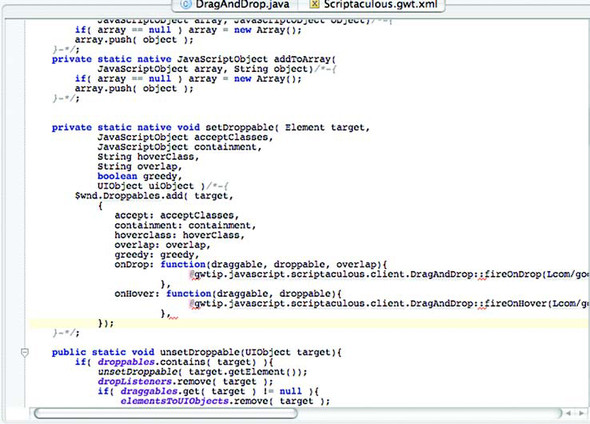
What makes IDEA’s support special? Well, two things stand out as great features. First, it restricts your project’s classpath scanning to modules declared as <inherits> in your module’s gwt.xml file. This is an incredibly useful feature if you’re dealing with multiple dependencies for packaged JSNI scripts, which we’ll look at in this chapter. The second feature is the syntax highlighting, which is smart enough to skip into /*-{ }-*/ blocks, giving you the advantages of JavaScript highlighting and formatting in your native methods, as pictured in figure 6.2. (Don’t worry if the code in the figure seems a bit alien right now—we’ll expand on this in section 6.3.)
You have seen two different methods for dealing with events and keeping track of lookups to smooth interactions between Java and JavaScript. In this section we’ll combine these two to handle drop events. We’ll also elaborate on an important and common troublesome task in working with JSNI—dealing with arrays.